
Free invoicing software.Now works with your AI.
Unlimited invoices, quotes, payment links, and QR codes. Send them from Claude, ChatGPT, Cursor, or the web app — whichever you prefer. Built for freelancers, contractors, consultants, and agencies.
Free to send. 3% + $0.30 when you collect. No monthly fee, no seat pricing, no trial.
Invoice #1042
Due in 14 days
No invoice needed
Create a payment page. Share a link or QR code. Done.
Don’t need a full invoice? Build a payment page in seconds — add your goods and services, set your prices, and share a link or QR code. Your customer opens it, picks what they want, and pays. Money lands in your Holdings account.
- List your goods and services with prices
- Generate a shareable payment link instantly
- Generate a QR code — print it, text it, post it at your table
- Customer selects what they want and pays by card
- No website needed. No app to install.
- Works in person, online, at events, or on a flyer
Same 3% + $0.30 fee. No monthly cost. No separate account.
Your payment page
Scan or tap to pay
One flow, start to finish.
Most tools make you stitch three products together. In Holdings it’s one path: quote → invoice → paid → booked.
Step 1 · Quote
Send a quote that looks like you mean business.
Build a branded quote in under a minute — your logo, your line items, your terms. Send it directly to your client or download it as a clean PDF.
- Custom logo and business name
- Line items, quantities, rates, discounts
- Optional notes and payment terms
- A professional document — not a spreadsheet screenshot
Step 2 · Convert
Client says yes? One click to invoice.
No re-entering data. No copy-paste. The approved quote becomes an invoice — line items, amounts, everything — and tracks as outstanding in your books.
- Approved quotes convert to invoices instantly
- Invoice number assigned automatically
- Outstanding balance appears in your dashboard
- Your books know money is coming before it arrives
Step 3 · Get paid
Add a payment link. Get paid faster.
Attach a payment link to any invoice. Your client clicks it, pays by card, and the money lands in your Holdings account. No chasing, no “did you get my invoice?”
- Payment link included on every invoice — no setup
- Client pays by card from any device
- 3% + $0.30 per payment — no monthly fee
- Invoice marked paid automatically — books update instantly
| Free | Software ($25/mo) | |
|---|---|---|
| Invoices & quotes | Unlimited | Unlimited |
| Payment links | Included | Included |
| Processing fee | 3% + $0.30 | 3% + $0.30 |
| “Powered by Holdings” | Shown | Removed |
| Custom branding | Logo + name | Full — your brand only |
| Automatic bookkeeping | Yes | Yes |
For retainers & subscriptions
Set it up once. Invoicing runs itself.
Clients on retainer? Monthly subscriptions? Set a recurring schedule and Holdings sends the invoice automatically — you get paid on time without thinking about it.
- Weekly, monthly, or custom schedule
- Invoice generates and sends automatically
- Client notified each cycle
- Every payment logs as revenue — no manual entry
Coming soon: automatic recurring payment collection.
Your brand, not ours — on Software
Invoices that look like they came from you.
On the Software plan, the “Powered by Holdings” mark comes off your invoices and quotes — replaced by your logo, your business name, and your brand color.
- Custom logo, colors, and business name
- Remove “Powered by Holdings”
- Looks like your company — not a fintech
- Included in Software, $25/mo
The real thing
Real invoices, really paid
A real Holdings workspace: $5,150 collected, one invoice still out, one drafted. Each payment posted itself to the books the moment it landed.
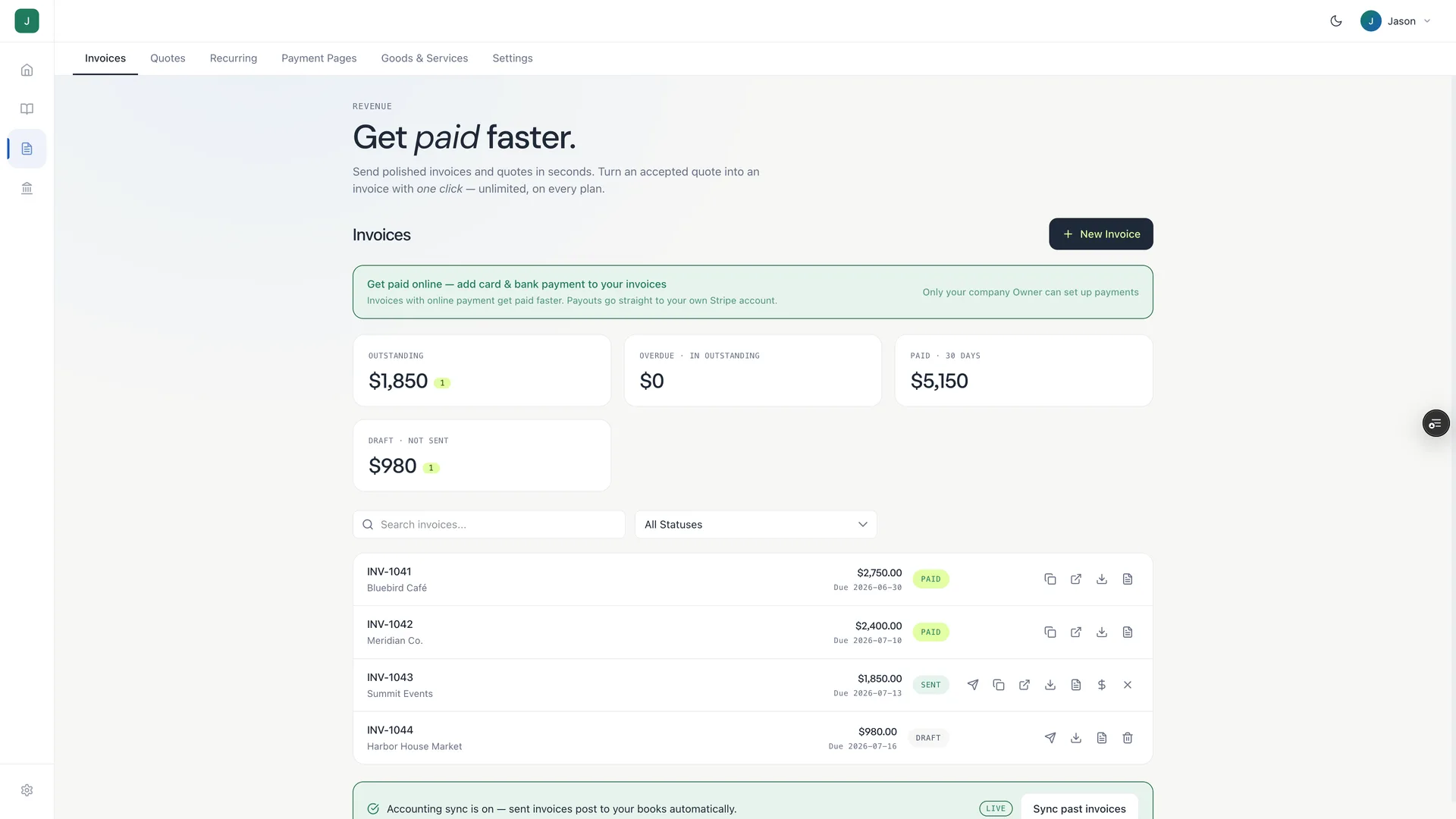
Your books update the moment you get paid.
Add Holdings accounting ($25/mo) and every invoice you send, every quote you convert, every payment you collect — it flows into your books automatically. Your P&L stays current. Your books stay ready for tax time — no manual reconciliation.
How Holdings invoicing stacks up
Quotes, invoices, and payment links in one tool — free, with full accounting available at $25/mo.
| Holdings | QuickBooks | FreshBooks | Wave | |
|---|---|---|---|---|
| Monthly fee (invoicing) | $0 | $30+ | $19+ | $0 |
| Payment processing fee | 3% + $0.30 | 2.99% + $0.25 | 2.9% + $0.30 | 2.9% + $0.60 |
| Quotes / estimates | Yes | Yes | Yes | Yes |
| Quote → invoice in one click | Yes | Yes | Yes | No |
| Auto-reconcile when paid | $25/mo plan | Separate plan | Yes | Limited |
| Works with your AI (MCP) | Yes | No | No | No |
| Recurring invoices | Yes | Yes | Yes | Yes |
New in 2026
Free AI invoicing — let your AI send invoices, quotes, and payment links
Connect Holdings to Claude, ChatGPT, Cursor, or any MCP-compatible AI agent, and let it draft invoices, follow up on unpaid ones, and record payments. You tell your AI who to bill and how much — it handles the invoicing. Free forever. No monthly fee.
Prefer to click? The web app and the free invoice generator do the same job — whichever way you send an invoice, the same free product handles it.
Invoicing for freelancers, contractors, consultants, and agencies
Holdings invoicing works for any service business that gets paid by the project, the hour, or the retainer. Unlimited invoices, quotes, and payment links — no monthly fee, no seat pricing.
Invoicing for freelancers
Per-project invoicing, retainer billing, and payment links for solo pros.
Invoicing for contractors
Job-based estimates and invoices, material passthrough, and QR-code payment.
Invoicing for consultants
Hourly, milestone, and retainer invoicing with recurring schedules.
Invoicing for agencies
Client retainers, recurring monthly invoicing, and multi-project billing.
Invoicing by trade & industry
Invoice and estimate templates built for your line of work.
Frequently asked questions
Straight answers about invoicing, quotes, and payments in Holdings
What does it cost to collect payments?
Sending invoices and quotes is always free. When a client pays through a payment link, we charge 3% + $0.30 per transaction. No monthly fee, no subscription required.
Is there a fee for quotes?
No. Quotes are free on every plan.
What's the difference between a quote and an invoice?
A quote is a proposal — “here's what I'd charge for this work.” An invoice is a request for payment — “here's what you owe.” In Holdings, a quote converts to an invoice in one click once your client approves.
What's the difference between a payment link and an invoice?
An invoice is sent to a specific client for specific work. A payment link (with QR code) is a shareable page where customers pick from your goods and services and pay on the spot — no client name, no specific project. Great for in-person payments, events, or anywhere you want people to self-select and pay.
Can I use the QR code in person?
Yes — that's exactly what it's built for. Print it, put it on a table at your market booth, display it at your front desk, or include it on a flyer. The customer scans, picks what they want, and pays by card.
Can I remove the “Powered by Holdings” branding?
Yes — on the Software plan ($25/mo) you get full custom branding. Your invoices and quotes show only your logo and business name, in your brand color.
Do I need a Holdings bank account to send invoices?
Sending invoices and quotes is free — no monthly fee, no trial. When a client pays via card or bank through a payment link, funds settle into your connected account. Free forever; 3% + $0.30 per payment collected.
When do I get paid after a client pays?
Payments typically settle within 1–2 business days.
How do recurring invoices work?
Set your billing schedule once — weekly, monthly, whatever fits your client — and Holdings sends the invoice automatically on that schedule. Automatic recurring payment collection is coming soon.
Can clients pay by bank transfer (ACH)?
Currently clients pay by card. ACH / bank transfer support is on the roadmap.
Your first invoice takes about 60 seconds.
Free account. No credit card. Free forever — 3% + $0.30 when you get paid.
Explore More
Free Invoice Generator
Create and download professional invoices in seconds.
Invoice Templates
Accounting in Holdings
Automatic categorization, P&L, and balance sheets.
All-in-One Software — $25/mo
Free Business Banking
Zero-fee checking with 1.75% APY, FDIC insured to $3M.
Plans & Pricing
Transparent pricing with zero hidden fees.
Holdings vs FreshBooks
Compare Holdings and FreshBooks for invoicing and accounting.
Holdings vs Wave
Compare Holdings and Wave for accounting features.