Holdings
Invoicing & Quotes

Invoices, quotes, payment links, QR codes.All from one place — free.

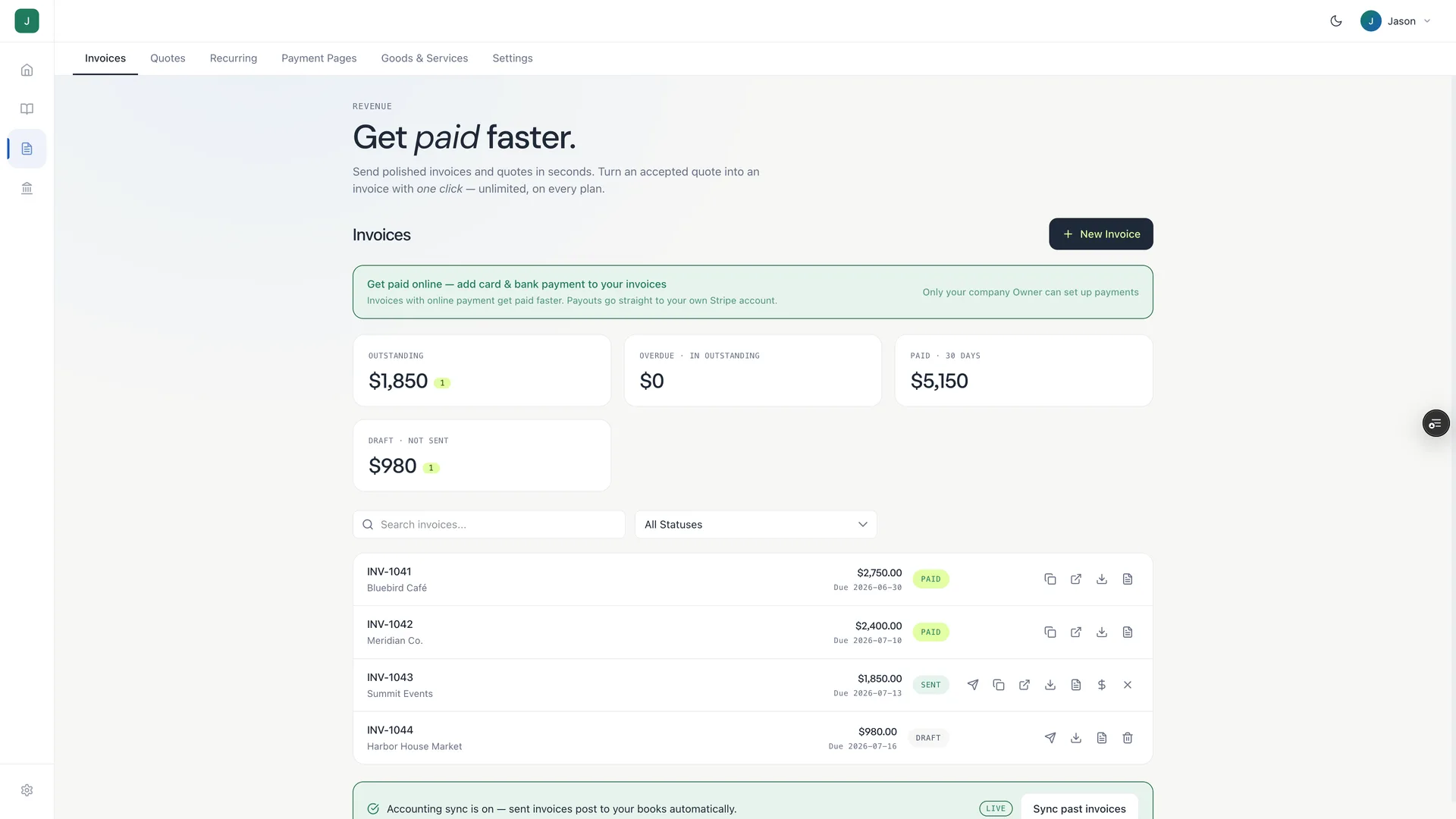
Send a quote. Convert to invoice. Share a payment link or QR code and let customers pay on the spot. And because Holdings is your bank too, the moment you’re paid it lands in your account — reconciled into your books automatically on the $25/mo plan. No bank feed, no CSV.

Free to send. 3% + $0.30 when you collect. Auto-reconcile with accounting at $25/mo.

Free to start No monthly feeFDIC insured banking included*
invoice from Holdings

Invoice #1042

Due in 14 days

Sent
Design retainer$2,400.00
Brand assets$850.00
Revisions (3)$450.00
Total$3,700.00

No invoice needed

Create a payment page. Share a link or QR code. Done.

Don’t need a full invoice? Build a payment page in seconds — add your goods and services, set your prices, and share a link or QR code. Your customer opens it, picks what they want, and pays. Money lands in your Holdings account.

  • List your goods and services with prices
  • Generate a shareable payment link instantly
  • Generate a QR code — print it, text it, post it at your table
  • Customer selects what they want and pays by card
  • No website needed. No app to install.
  • Works in person, online, at events, or on a flyer

Same 3% + $0.30 fee. No monthly cost. No separate account.

Your payment page

Scan or tap to pay

Service businesses — “scan to pay for today's session”
Pop-up shops and markets — QR on the table, no card reader
Event tickets and registrations
Nonprofit donations and fundraiser tables
Freelancers — “here's my link, pick the package”

One flow, start to finish.

Most tools make you stitch three products together. In Holdings it’s one path: quote → invoice → paid → booked.

Step 1 · Quote

Send a quote that looks like you mean business.

Build a branded quote in under a minute — your logo, your line items, your terms. Send it directly to your client or download it as a clean PDF.

  • Custom logo and business name
  • Line items, quantities, rates, discounts
  • Optional notes and payment terms
  • A professional document — not a spreadsheet screenshot

Step 2 · Convert

Client says yes? One click to invoice.

No re-entering data. No copy-paste. The approved quote becomes an invoice — line items, amounts, everything — and tracks as outstanding in your books.

  • Approved quotes convert to invoices instantly
  • Invoice number assigned automatically
  • Outstanding balance appears in your dashboard
  • Your books know money is coming before it arrives

Step 3 · Get paid

Add a payment link. Get paid faster.

Attach a payment link to any invoice. Your client clicks it, pays by card, and the money lands in your Holdings account. No chasing, no “did you get my invoice?”

  • Payment link included on every invoice — no setup
  • Client pays by card from any device
  • 3% + $0.30 per payment — no monthly fee
  • Invoice marked paid automatically — books update instantly
FreeSoftware ($25/mo)
Invoices & quotesUnlimitedUnlimited
Payment linksIncludedIncluded
Processing fee3% + $0.303% + $0.30
“Powered by Holdings”ShownRemoved
Custom brandingLogo + nameFull — your brand only
Automatic bookkeepingYesYes

For retainers & subscriptions

Set it up once. Invoicing runs itself.

Clients on retainer? Monthly subscriptions? Set a recurring schedule and Holdings sends the invoice automatically — you get paid on time without thinking about it.

  • Weekly, monthly, or custom schedule
  • Invoice generates and sends automatically
  • Client notified each cycle
  • Every payment logs as revenue — no manual entry

Coming soon: automatic recurring payment collection.

Your brand, not ours — on Software

Invoices that look like they came from you.

On the Software plan, the “Powered by Holdings” mark comes off your invoices and quotes — replaced by your logo, your business name, and your brand color.

  • Custom logo, colors, and business name
  • Remove “Powered by Holdings”
  • Looks like your company — not a fintech
  • Included in Software, $25/mo

Your books update the moment you get paid.

Add Holdings accounting ($25/mo) and every invoice you send, every quote you convert, every payment you collect — it flows into your books automatically. Your P&L stays current. Your books stay ready for tax time — no manual reconciliation.

Revenue logged when payment hits
Invoices categorized automatically
Outstanding receivables tracked live
Export to CSV or share view-only CPA access

How Holdings invoicing stacks up

Quotes, invoices, and payment links in one tool — free, with full accounting available at $25/mo.

HoldingsQuickBooksFreshBooksWave
Monthly fee (invoicing)$0$30+$19+$0
Payment processing fee3% + $0.302.99% + $0.252.9% + $0.302.9% + $0.60
Quotes / estimatesYesYesYesYes
Quote → invoice in one clickYesYesYesNo
Auto-reconcile when paid$25/mo planSeparate planYesLimited
Banking includedFreeNoNoNo
Recurring invoicesYesYesYesYes

Frequently asked questions

Straight answers about invoicing, quotes, and payments in Holdings

What does it cost to collect payments?

Sending invoices and quotes is always free. When a client pays through a payment link, we charge 3% + $0.30 per transaction. No monthly fee, no subscription required.

Is there a fee for quotes?

No. Quotes are free on every plan.

What's the difference between a quote and an invoice?

A quote is a proposal — “here's what I'd charge for this work.” An invoice is a request for payment — “here's what you owe.” In Holdings, a quote converts to an invoice in one click once your client approves.

What's the difference between a payment link and an invoice?

An invoice is sent to a specific client for specific work. A payment link (with QR code) is a shareable page where customers pick from your goods and services and pay on the spot — no client name, no specific project. Great for in-person payments, events, or anywhere you want people to self-select and pay.

Can I use the QR code in person?

Yes — that's exactly what it's built for. Print it, put it on a table at your market booth, display it at your front desk, or include it on a flyer. The customer scans, picks what they want, and pays by card.

Can I remove the “Powered by Holdings” branding?

Yes — on the Software plan ($25/mo) you get full custom branding. Your invoices and quotes show only your logo and business name, in your brand color.

Do I need a Holdings bank account to send invoices?

You need a Holdings account to use payment links (so we know where to send the money). Creating and downloading invoices and quotes as PDFs is free for everyone.

When do I get paid after a client pays?

Payments typically settle within 1–2 business days and land in your Holdings checking account.

How do recurring invoices work?

Set your billing schedule once — weekly, monthly, whatever fits your client — and Holdings sends the invoice automatically on that schedule. Automatic recurring payment collection is coming soon.

Can clients pay by bank transfer (ACH)?

Currently clients pay by card. ACH / bank transfer support is on the roadmap.

Your first invoice takes about 60 seconds.

Free account. No credit check. FDIC insured banking included*.

Disclosures

Holdings is a financial technology company and is not a bank. Banking services are provided by i3 Bank, Member FDIC. The Holdings Visa Debit Card is issued by i3 Bank pursuant to a license from Visa U.S.A. Inc. and may be used anywhere Visa cards are accepted.

No account or domestic transaction fees. Some foreign transaction fees may apply in limited circumstances.

Annual Percentage Yield (APY) is variable and subject to change after account opening. Rate is compounded monthly and credited monthly.

Deposits are insured up to $3 million total through a combination of i3 Bank, Member FDIC, and additional program banks. Each account is separately insured up to $250,000 per account holder per bank. Holdings accounts are subject to approval. Terms and conditions apply.