
Create a payment page.
Share a link or QR code.
Get paid — no invoice needed.
List your goods and services. Generate a link and a QR code. Customer opens it, picks what they want, pays by card. Money lands in your Holdings account. Free to set up. 3% + $0.30 per payment. No monthly fee.
Your goods and services, on a link.
Build a simple payment page in minutes. Add what you sell — services, products, packages, sessions, whatever. Set your prices. Holdings generates a shareable link and a QR code you can use anywhere.
Step 1 · Build
Build your page.
Add your goods and services with prices. Takes about 2 minutes.
Step 2 · Share
Share your link or QR code.
Text the link, email it, post it on your website, print the QR code and stick it on your counter.
Step 3 · Get paid
Customer picks and pays.
They open the page, select what they want, and pay by card. You get notified. Money moves.
Works wherever you work.
At markets and pop-ups
Print your QR code and put it on your table. Customers scan, pick their items, pay by card. No card reader. No app. No fumbling with cash.
At your service desk or studio
Post the QR code at checkout. Clients pick their service and pay before they leave. Cleaner than sending a follow-up invoice after the fact.
For freelancers and consultants
Put your payment link in your email signature, your website, or on a proposal. Clients pick the package that fits and pay directly.
At events and fundraisers
Sell tickets, sponsorships, or merchandise with a QR code on your event flyer. Works for nonprofits, schools, community organizations.
Online — without a full website
No website? No problem. Your payment page is the page. Share the link on social, in a DM, in your bio.
No monthly fee. Just 3% + $0.30 when someone pays.
Creating a payment page and generating your link and QR code is free. You pay nothing until a customer actually pays you. When they do: 3% + $0.30 per transaction. That’s it.
| Holdings | Square | Stripe | PayPal | |
|---|---|---|---|---|
| Monthly fee | $0 | $0 | $0 | $0 |
| Payment processing | 3% + $0.30 | 2.6% + $0.10 | 2.9% + $0.30 | 3.49% + $0.49 |
| Works with your AI (MCP) | Yes | No | No | No |
| Automatic bookkeeping | Yes | No | No | No |
| Invoicing included | Yes | Paid add-on | Paid add-on | Limited |
| QR code | Yes | Yes | Yes | Yes |
On the Software plan ($25/mo): remove the “powered by Holdings” branding and use your own logo and business name on your payment page.
Every payment lands in your books.
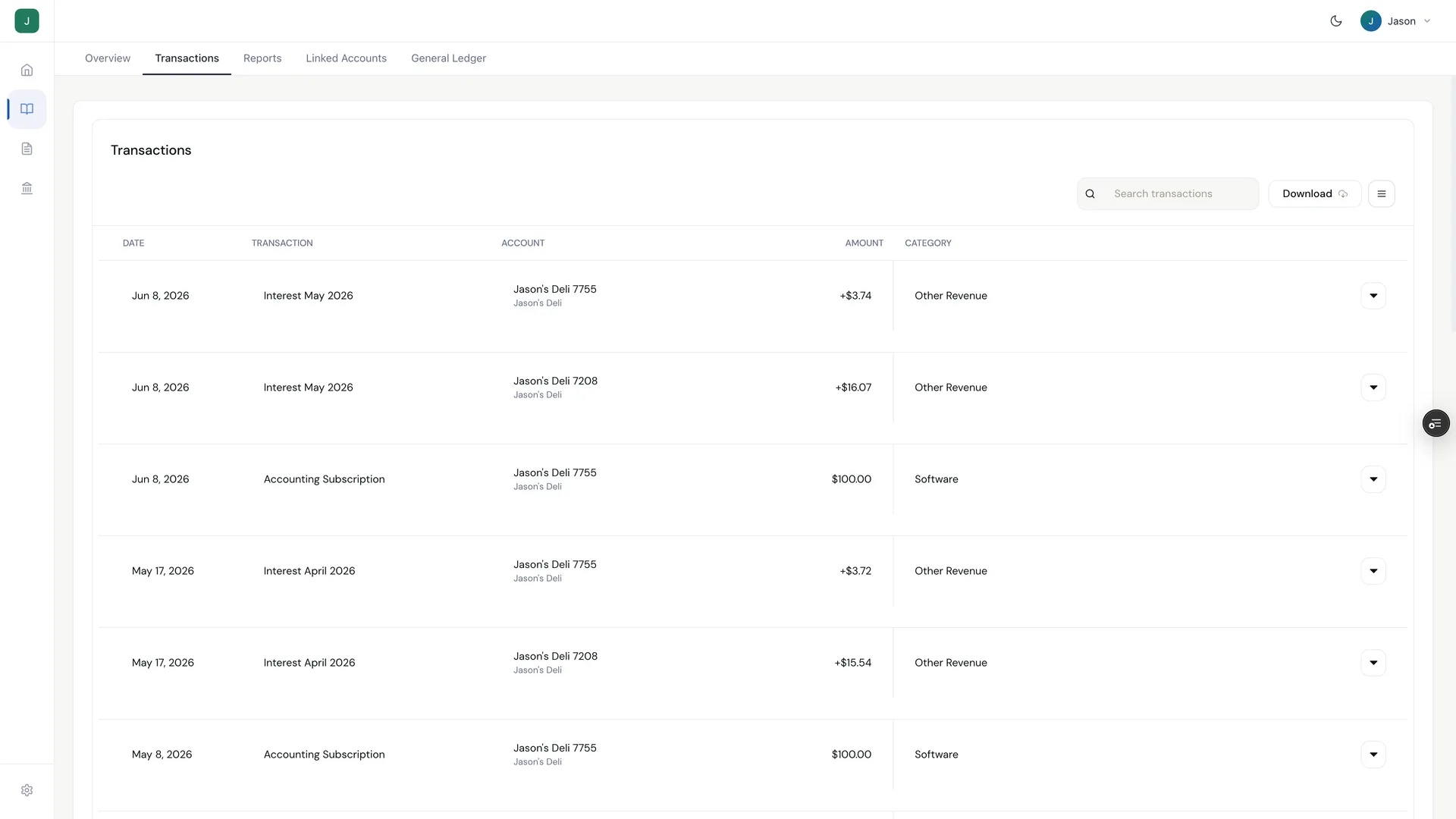
When a customer pays, it logs as revenue in your Holdings books automatically. No manual entry. Your P&L stays current. Your books are always clean. This is the part no payment tool does on its own — Holdings does payments, invoicing, and bookkeeping together, so the data flows through automatically.
The real thing
Money lands. Books follow.
A real Holdings workspace's transaction feed — every payment categorized and matched as it arrived. Month-end has nothing left to do.
Payment link vs. invoice — which one do you need?
| Payment Link + QR | Invoice | |
|---|---|---|
| Who it’s for | Any customer, self-serve | Specific client, specific project |
| How it’s sent | Link or QR code | Email to named recipient |
| Customer experience | Picks from your menu and pays | Receives bill, pays stated amount |
| Best for | In-person, events, repeat services | Project work, contractors, B2B |
| Both available in Holdings | Yes | Yes |
You can use both — they’re in the same payments tab.
Frequently asked questions
Straight answers about payment links and QR codes in Holdings
Do I need a Holdings bank account to use payment links?
Yes — Holdings needs to know where to send the money. Opening a Holdings account is free (no credit check, takes 5 minutes) and comes with free checking at 1.75% APY.
Can I use the QR code in person?
That’s exactly what it’s built for. Download it, print it, and put it anywhere — your counter, your table at a market, your window, a flyer, an email. Customer scans with any phone camera and the payment page opens instantly.
How do I get paid?
Payments process by card and settle to your connected account, typically within 1–2 business days.
Can I put multiple products and services on one page?
Yes. Build out your menu — add as many items as you need. Customers can select multiple items in one transaction.
Can I customize the look of my payment page?
On the free plan, your payment page shows your business name with Holdings branding. On the Software plan ($25/mo), you can use your own logo and remove the Holdings footer — your brand only.
Is this different from invoicing?
Yes. An invoice is sent to a specific client for a specific job or project — it names them, details the work, and they pay the stated amount. A payment link is a self-serve page anyone can access — they pick what they want and pay. Both are in your Holdings payments tab.
What cards can customers use?
All major cards — Visa, Mastercard, American Express, Discover.
Set up your first payment page in 2 minutes.
Free account. No credit check. 3% + $0.30 per payment — that’s the only fee.
Explore More
Invoicing & Quotes
Giving — Donation Pages for Nonprofits
Agentic Invoicing
Connected Business Banking
Zero-fee checking with 1.75% APY, FDIC insured to $3M.
All-in-One Software — $25/mo
Plans & Pricing
Transparent pricing with zero hidden fees.
Business Debit Cards
Accounting in Holdings
Automatic categorization, P&L, and balance sheets.