
Switch from QuickBooks in an afternoon.
Here's the part that makes the move easy: with Holdings, the bank is the books — so there's nothing to reconcile after you switch. No final QuickBooks close, no last bank-feed cleanup, no two systems to keep in sync. Open a free account, move your accounts over, and your books start keeping themselves.
No lock-in. Run both in parallel for a month if you want, then cancel QuickBooks on your terms.
The reason people stay on QuickBooks isn't love — it's fear of the move. The dread of a messy migration, lost history, and a month of double-entry purgatory keeps owners paying for a tool they've outgrown.
Switching to Holdings is different for one structural reason: it's both your bank and your accounting in one product. There's no second system to reconcile against, so there's no fragile bank feed to migrate, no final reconciliation to chase, and no month-end close waiting for you on the other side. You move your money in, and the books are already keeping themselves.
What “after QuickBooks” actually looks like
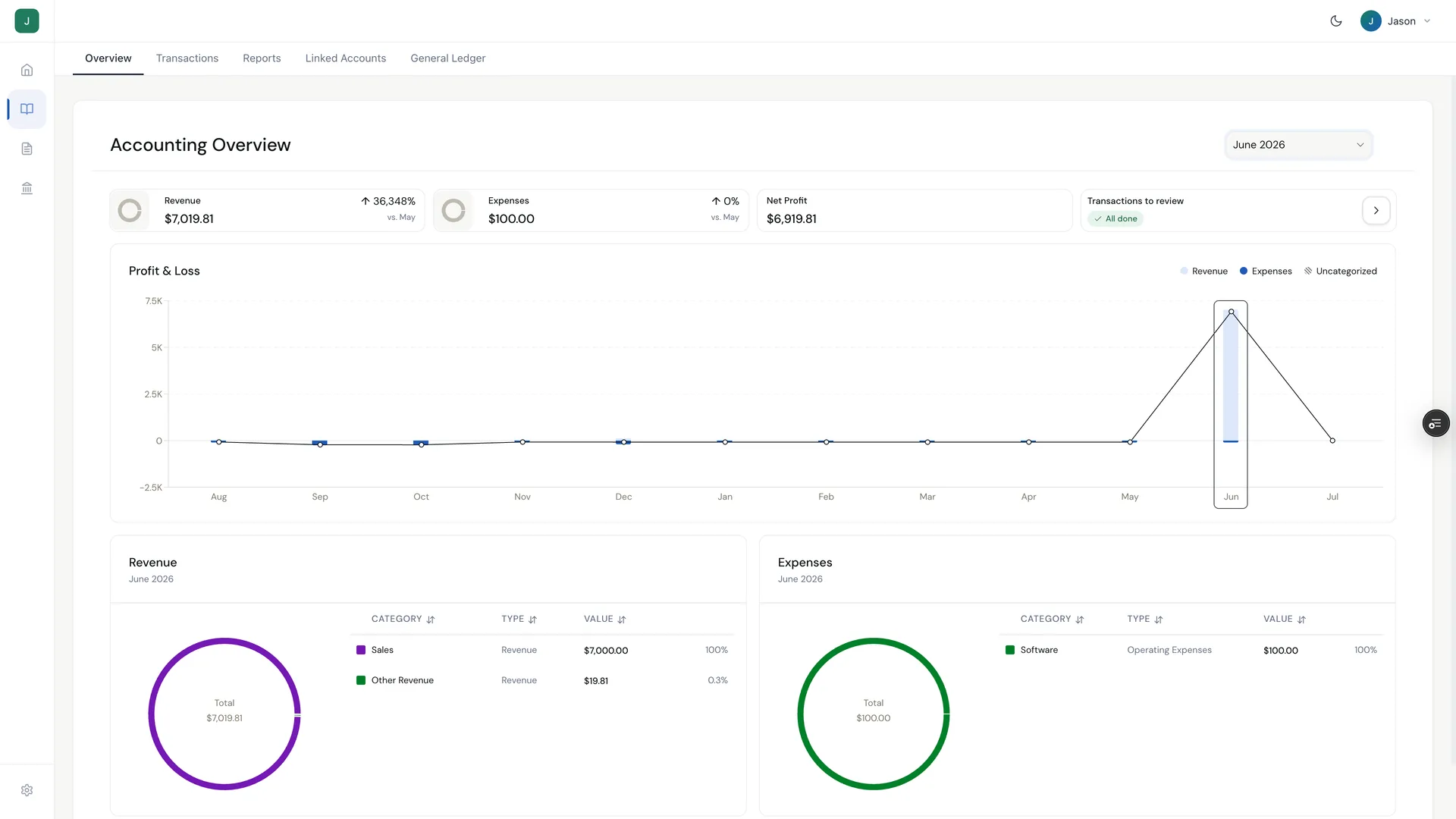
This is a real Holdings workspace, not a mock. Invoices went out, clients paid, and the month ended with the review queue at zero — no import, no matching, nothing to reconcile.
How to switch, step by step
A guided, no-surprises move. You import your own data (we take CSV), run both tools in parallel as long as you like, and cancel QuickBooks only when you're ready.
- 1
Open your free Holdings account
About 5 minutesSign up online — no branch visit, no minimum deposit, no card required. Banking is free, so you can get set up before you change anything on the QuickBooks side.
- 2
Connect or move your accounts
Same dayBring your money over with free ACH or wire, and connect external accounts so everything lives in one place. New income and spending start posting to your Holdings books from day one.
- 3
Export your QuickBooks data
15–30 minutesExport your lists and history from QuickBooks as CSV (chart of accounts, customers, vendors, open invoices). Holdings takes CSV — this is a guided, hands-on import you control, not a magic one-click sync. Keep your QuickBooks reports as your historical record.
- 4
Run both in parallel for a month (optional)
One billing cycleWant to be cautious? Keep QuickBooks open for a cycle and run Holdings alongside it. Compare the numbers, get comfortable, and move at your own pace. There's no hard cutover.
- 5
Cancel QuickBooks when you're ready
When it suits youWhen Holdings is your source of truth, cancel your QuickBooks subscription. No lock-in, no exit fee, nothing held hostage — you leave on your terms.
What you stop paying for — and what you stop doing
Stop paying for
- ×The QuickBooks subscription (roughly $30–90/mo)
- ×A separate invoicing tool — invoicing is included free
- ×QuickBooks Payments (2.9% + $0.25 per card charge)
Stop doing
- ×The month-end close — there's nothing to reconcile
- ×Importing and matching bank-feed transactions
- ×Waiting on the feed to update before the books are right
A paid invoice is already in your books. The payment and the journal entry are the same event, so there's nothing to reconcile and no month-end close.
What's different on day one
In QuickBooks, a paid invoice is a to-do: the payment lands in your bank, then you wait for the feed, then you match it, then it's finally in the books. With Holdings, a paid invoice is already in your books — the payment and the journal entry are the same event, because the bank and the ledger are the same product.
So from your very first day on Holdings: send an invoice, get paid, and your P&L is already current. No import, no match, no reconcile. It's the same money math you've always done — minus the monthly cleanup that QuickBooks made part of the job.
Frequently asked questions
Will I lose my QuickBooks history?
No. Your QuickBooks history stays in QuickBooks — export it as CSV and save your reports (P&L, Balance Sheet, General Ledger) as your historical record before you cancel. Holdings keeps your books going forward from the day you move in. Many owners keep their exported QuickBooks files as the archive for prior years and run Holdings for everything new.
How long does it take to switch?
Opening your free Holdings account takes about 5 minutes, and the hands-on import is typically under an hour. If you want to be careful, run Holdings and QuickBooks in parallel for one billing cycle before you cancel — so the whole transition can be done in an afternoon, or stretched over a month at your own pace. There's no hard cutover and no lock-in.
Do I have to switch my bank too?
No. Connect your existing bank via Plaid and Holdings pulls transactions, categorizes them, and keeps the P&L, Balance Sheet, and General Ledger current. Holdings also includes free business banking via i3 Bank (Member FDIC, coverage to $3M, 1.75% APY) for owners who want the whole stack in one place — deposits from Holdings banking auto-reconcile to your books the moment they clear, no Plaid delay.
What does Holdings cost vs QuickBooks?
QuickBooks Online runs roughly $30–90/mo depending on tier, and you still pay separately for an invoicing tool. Holdings gives you unlimited invoicing, quotes, and payment links free — no monthly fee — free business banking via i3 Bank (Member FDIC, coverage to $3M, 1.75% APY), and full double-entry accounting for $25/mo with a 30-day free trial. For most that's one fewer subscription and a lower monthly bill.
Move once. Get on with it.
Free unlimited invoicing. Free full double-entry accounting. Connected business banking via i3 Bank (Member FDIC, coverage to $3M) underneath — all on one free plan. Run both in parallel as long as you like — no lock-in.
Start your free accountMore on switching & QuickBooks
Holdings vs QuickBooks
Built-in accounting vs add-on accounting software.
QuickBooks Alternative
How to Switch Business Banks
Step-by-step guide to switching your business bank.
Full Accounting — $25/mo
Automatic categorization, P&L, and balance sheets.
Calculate Your Savings
See how much you could save by switching to Holdings.
Plans & Pricing
Transparent pricing with zero hidden fees.