Software your AI can run.

Let your AI send
your invoices.

Tell Claude, ChatGPT, or Cursor what to bill — you approve every send. Or use the web app. Invoices, quotes, payment links, and QR codes, all one click away.

How it works

Direct your AI.
It runs the invoicing.

Connect Holdings to Claude, ChatGPT, Cursor, or any MCP-compatible agent. Tell it what needs to happen. It drafts, sends, chases, reconciles. You approve every send.

  1. Connect your AI to Holdings

    Install the Holdings MCP server in Claude Desktop, ChatGPT, Cursor, or a custom agent. Takes about a minute. The AI now knows how to run your invoicing.

  2. Direct it in plain English

    “Send Acme the retainer invoice. Follow up with the Miller account. Mark the Reyes deposit paid.” The AI drafts each action for your review.

  3. Approve before every send

    Nothing goes out without your yes. See the draft, edit if needed, hit approve. Every action — human or agent — is logged with a full audit trail.

  4. Payments reconcile themselves

    With the accounting add-on, a paid invoice is already in your books. Payment and journal entry are the same event; nothing to reconcile at month-end.

Prefer to click? The web app does the same thing. Both paths, one product.

What it does

One tool. Every part of getting paid.

Everything an AI (or a human) needs to run the whole invoicing loop end-to-end. No stitching. No per-feature pricing.

Quotes

Branded quotes with your logo and payment terms. Convert to an invoice in one click when the client approves.

Invoices

Unlimited. Send with a payment link. Mark paid manually, by webhook, or let your AI do it.

Payment links

Shareable page — customers pick from your goods and services and pay. No invoice needed. No website needed.

QR codes

Print it, post it, put it on the table. Scan-to-pay for markets, events, front desks, or wherever people are.

Recurring

Weekly, monthly, or custom. Retainers and subscriptions send themselves on your schedule.

Auto-reminders

Follow up on overdue balances on your cadence — or let your AI decide when to nudge.

From the product

Sent, paid, already in the books.

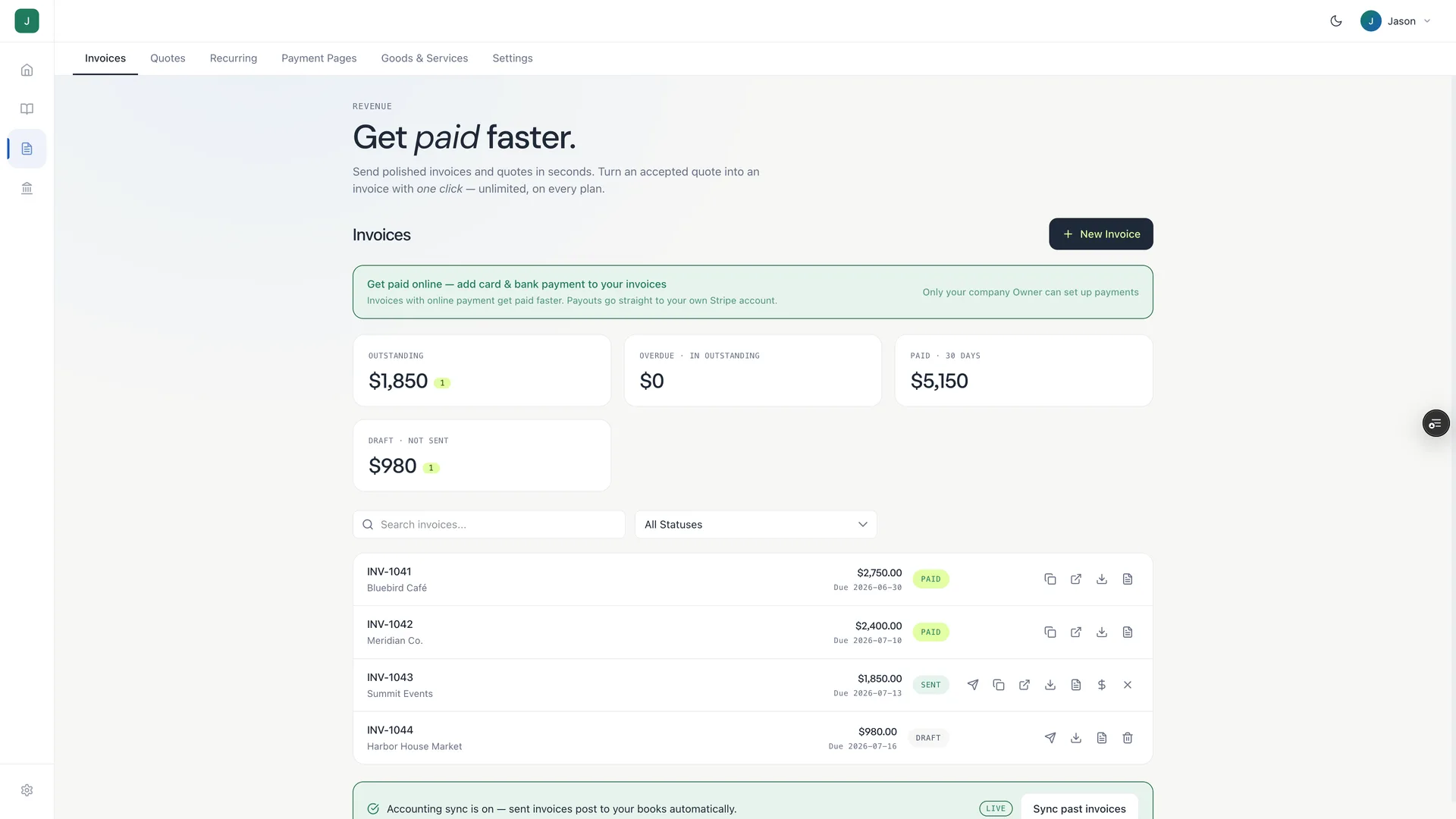
A working Holdings account: $5,150 collected, one invoice still out, one drafted. Every payment posted itself to the books the moment it landed.

Holdings invoicing screen showing $5,150 of paid invoices, an outstanding invoice and a draft, each with live payment status badges
The invoice list — paid, sent, and draft — with accounting sync on. Sent invoices post to your books automatically.

One invoice, three moments

The invoice — start to paid.
Everything tracked.

From first draft to deposited funds — one invoice, one thread. Your AI runs it; your books reflect it.

Draft

From

Your Company, LLC

Invoice

#H-2148

Bill to

Acme Corp

accounts@acme.com

DescriptionAmount
December retainer$8,400.00
Total · net 30 · due Jan 5$8,400.00

Sent

From

Your Company, LLC

Invoice

#H-2148

Bill to

Acme Corp

Sent to acme@acme.com · Dec 5 · due Jan 5

DescriptionAmount
December retainer$8,400.00
Total due Jan 5$8,400.00
Paid

From

Your Company, LLC

Invoice

#H-2148

Bill to

Acme Corp

Paid Dec 28 · $8,400 deposited

DescriptionAmount
December retainer$8,400.00
Total$8,400.00

Optional add-on

Books that stay current.
Automatically.

Add accounting for $25/mo (30-day trial). Every invoice sent, every payment collected — already in your books. Payment and journal entry are the same event; nothing to reconcile at month-end.

See the accounting add-on

Questions

Straight answers.

What does it cost to send invoices?
Sending invoices, quotes, payment links, and QR codes has no monthly fee. When a client pays via payment link, standard card processing applies (3% + $0.30 per transaction) — no Holdings markup, no subscription. Optional accounting add-on is $25/mo with a 30-day free trial.
Is there a fee for quotes?
No. Quotes are always no-cost, whether on the free plan or the accounting add-on.
What's the difference between a quote and an invoice?
A quote is a proposal — “here's what I'd charge for this work.” An invoice is a request for payment — “here's what you owe.” In Holdings, an approved quote converts to an invoice in one click. The AI can convert it for you if you tell it to.
What's the difference between a payment link and an invoice?
An invoice is sent to a specific client for specific work. A payment link (with QR code) is a shareable page where customers pick from your goods and services and pay on the spot — no client name, no specific project. Great for in-person, events, and shared payment moments.
Can I use the QR code in person?
Yes — that's what it's built for. Print it, put it on a table at your market booth, display it at your front desk, or include it on a flyer. The customer scans, picks what they want, and pays by card.
Can I remove the “Powered by Holdings” branding?
Yes — on the Software plan ($25/mo) your invoices and quotes show only your logo, business name, and brand color. On the free plan a small “Powered by Holdings” mark stays.
How does the AI part work?
Holdings ships an MCP (Model Context Protocol) server. Any MCP-compatible AI client — Claude Desktop, ChatGPT, Cursor, or your own agent — connects to your Holdings account and can operate the invoicing directly. You direct it in natural language; it drafts, sends, chases, reconciles. You approve every send. Full audit trail on every action.
When do I get paid after a client pays?
Payments typically settle within 1–2 business days.
How do recurring invoices work?
Set a schedule once — weekly, monthly, whatever fits your client — and Holdings sends the invoice automatically on that cadence. Automatic recurring payment collection is on the roadmap.
Can clients pay by bank transfer (ACH)?
Today clients pay by card. ACH / bank transfer support is on the roadmap.

Send your first invoice.
Let your AI send the rest.

No monthly fee. No card to start. Connect Claude, ChatGPT, or Cursor — or just open the web app.