
Nonprofit Accounting Software Comparison: Top Options Reviewed
Evaluating nonprofit accounting software is time-consuming. This comparison breaks tools into three categories, covers the features that actually matter,
Choosing accounting software for a nonprofit is a different exercise than choosing it for a business. The feature set that matters is different, the reports you need are different, and the way you think about money is fundamentally different. This comparison breaks down what's actually available, what features separate the tiers, and how to evaluate your options without getting lost in marketing pages.
Three Categories of Nonprofit Accounting Software
The market splits into three clear tiers. Understanding which tier you belong in saves you from either overpaying for features you won't use or outgrowing your software in 18 months.
Category 1: Business Software with Nonprofit Workarounds
Examples: QuickBooks Online, Xero, FreshBooks, Wave
What you get: Solid general accounting — invoicing, expense tracking, bank reconciliation, financial reports. These platforms are well-built for tracking revenue and expenses against a bottom line.
The nonprofit gap: These tools were designed around the concept of profit. Nonprofits don't have profit — they have net assets, fund balances, and restricted donations. To make business software work for a nonprofit, you'll use classes, tags, or tracking categories as proxies for funds. It works for simple situations, but the workarounds compound as your organization grows.
Specifically, you'll struggle with:
- Generating a Statement of Financial Position or Statement of Activities without manual report manipulation
- Tracking donor restrictions and restriction releases
- Budget-to-actual reporting at the fund level
- Functional expense allocation (program vs. management vs. fundraising)
- Audit preparation — auditors know the workarounds and often flag them
Best for: Nonprofits under $250K annual budget with no restricted funds and no audit requirement. If a donor has never told you "use this money for X," business software will get the job done.
Category 2: Nonprofit-Specific Accounting Software
Examples: Aplos, Araize FastFund, AccuFund, MoneyMinder, IconCMO (churches)
What you get: Fund accounting built into the core architecture. Nonprofit financial statements generated natively. Donor restriction tracking. Grant management. These platforms understand that a nonprofit's chart of accounts looks different from a business's.
The trade-off: User interfaces can feel dated compared to the polished consumer experience of QuickBooks or Xero. Implementation may require more setup time. Integrations with third-party tools (payroll, donor management, banking) vary widely.
Specifically, you get:
- Self-balancing fund ledgers
- Net asset classification (with/without donor restrictions) baked into the system
- Functional expense reports that satisfy Form 990 requirements
- Grant-level budget tracking and reporting
- Board-ready financial reports without Excel gymnastics
Best for: Established nonprofits with multiple programs, restricted funds, or audit requirements. If you're filing Form 990 and receiving grants, this is probably your tier.
Category 3: Enterprise Nonprofit Financial Management
Examples: Sage Intacct, Blackbaud Financial Edge NXT, MIP Fund Accounting, Abila
What you get: Everything in Category 2, plus multi-entity consolidation, advanced grant management, complex allocation rules, sophisticated approval workflows, custom reporting, and API access for building integrations.
The trade-off: Expensive — both the subscription and the implementation. Sage Intacct implementations routinely cost $10,000–$50,000+ before you enter a single transaction. These platforms require training, and you'll likely need a dedicated finance person (or team) to operate them effectively.
Specifically, you get:
- Multi-entity and multi-currency support
- Custom dimensions beyond standard fund tracking
- Advanced workflow automation and approval chains
- Sophisticated inter-fund and inter-entity transactions
- Compliance reporting for complex federal grants
- Real-time consolidation across entities
Best for: Nonprofits over $5M in annual revenue, organizations with multiple legal entities, and those managing large federal grant portfolios. If you have a CFO or finance director, you're probably shopping in this tier.
Features That Actually Matter: A Detailed Breakdown
Marketing pages list dozens of features. Here's what actually impacts your day-to-day operations, your audit experience, and your board's confidence in the numbers.
Fund Accounting Capabilities
This is the single most important differentiator. Not all "fund accounting" is created equal.
| Capability | Business Software | Nonprofit-Specific | Enterprise |
|---|---|---|---|
| Track expenses by fund | Via classes/tags (workaround) | Native fund ledgers | Native + custom dimensions |
| Self-balancing fund ledgers | No | Yes | Yes |
| Net asset classification | Manual tracking | Automated | Automated + custom rules |
| Restriction release tracking | Manual journal entries | Built-in workflows | Built-in + batch processing |
| Inter-fund transfers | Manual journal entries | Dedicated transaction type | Automated with approval chains |
| Fund-level budget vs. actual | Limited | Yes | Yes + forecasting |
| Endowment tracking | No | Basic | Advanced (UPMIFA compliance) |
Why this matters: If a platform says "fund accounting" but really means "you can tag transactions by fund," that's not fund accounting. True fund accounting means each fund has its own assets, liabilities, and net assets — a self-balancing set of books within the larger system. When a donor asks "how much of our grant is left?" the answer should be one click away, not a spreadsheet exercise.
Financial Reporting
| Report | Business Software | Nonprofit-Specific | Enterprise |
|---|---|---|---|
| Statement of Financial Position | Manual conversion from balance sheet | Native | Native + custom layouts |
| Statement of Activities | Manual conversion from P&L | Native | Native + multi-dimensional |
| Statement of Functional Expenses | Manual allocation in Excel | Built-in allocation | Automated allocation rules |
| Statement of Cash Flows | Usually available | Available | Available + forecasting |
| Board dashboards | Basic | Good | Customizable |
| Grant-specific reports | Manual | Built-in | Advanced + funder templates |
| Form 990 support | Minimal | Good | Comprehensive |
Grant Management
For organizations that receive grants — especially government grants — this can make or break your experience.
| Capability | Business Software | Nonprofit-Specific | Enterprise |
|---|---|---|---|
| Track expenses by grant | Via tags (manual) | Dedicated grant tracking | Advanced + compliance tools |
| Budget-to-actual by grant | Manual spreadsheet | Built-in reports | Real-time dashboards |
| Grant billing/invoicing | Generic invoicing | Grant-specific billing | Automated draw-down requests |
| Compliance reporting | Manual | Templates available | Automated (SF-425, etc.) |
| Grant period tracking | Manual calendar | Built-in date tracking | Automated alerts + renewals |
| Indirect cost allocation | Manual calculation | Basic allocation | Automated rate calculation |
User Experience and Accessibility
This matters more than people admit. If the software is painful to use, your team avoids using it — and that leads to backlogs, errors, and stressful catch-up sessions before board meetings.
| Aspect | Business Software | Nonprofit-Specific | Enterprise |
|---|---|---|---|
| Learning curve | Low (1–2 days) | Moderate (1–2 weeks) | High (weeks to months) |
| Interface design | Modern, polished | Varies widely | Functional, not pretty |
| Mobile access | Good | Some platforms | Usually yes |
| Bank feeds | Excellent | Most platforms | Yes |
| Document attachment | Yes | Most platforms | Yes + workflow |
| Multi-user access | Yes (often limited) | Yes | Yes + granular roles |
Fund Accounting as a Key Differentiator
If there's one section of this comparison to read carefully, it's this one. Fund accounting capability is the primary factor that separates "adequate" nonprofit software from "actually built for nonprofits."
The Three Fund Categories in Practice
Your software needs to handle all three types of funds your organization encounters:
Unrestricted funds are straightforward — money in, money out, track it accurately. Every platform handles this.
Temporarily restricted funds are where things get interesting. When a donor gives $10,000 for your mentoring program, your software needs to:
- Record the revenue as temporarily restricted
- Track expenses against that specific fund
- Release the restriction as eligible expenses are incurred
- Show the remaining balance at any point in time
- Report accurately on both the restricted and unrestricted portions
Business software can sort of do this with classes and manual journal entries. It works until it doesn't — usually when your auditor asks for a schedule of temporarily restricted net assets and you realize you've been tracking it in a spreadsheet alongside the accounting system.
Permanently restricted funds (endowments) require tracking the original principal separately from investment returns, applying spending policies (like the UPMIFA 7% rule), and reporting on the endowment's growth over time. This is specialized functionality that only nonprofit-specific and enterprise platforms handle well.
Red Flags When Evaluating Fund Accounting Claims
Watch out for these during demos:
- "Just use classes for funds." This means the platform doesn't have real fund accounting. Classes are labels, not ledgers.
- "You can customize the reports." If generating a Statement of Activities by fund requires a custom report that takes 20 minutes to build, that's not a feature — it's a workaround.
- "Our nonprofit customers love us." Ask for references at organizations similar to yours in size and complexity. A $50K community group and a $10M social services agency have very different needs.
- "Fund accounting is available in our premium tier." Understand exactly what you get at each pricing level. Sometimes "fund accounting" at the basic tier just means tagging, while the real functionality requires a much more expensive plan.
The Evaluation Checklist: How to Actually Decide
Don't just watch demos and pick the one with the nicest interface. Here's a structured evaluation process:
Step 1: Document Your Requirements (Before You Look at Any Software)
Write down:
- How many funds do you currently track?
- Do you receive restricted grants? How many active at any time?
- What financial statements does your board require?
- Are you audited? What does your auditor currently flag as problematic?
- How many people need access to the system? With what permissions?
- What other systems need to connect (payroll, donor management, banking)?
- What's your annual accounting software budget (including implementation)?
Step 2: Narrow to 2–3 Options in Your Tier
Based on your budget and complexity:
- Under $250K annual budget, no restricted funds → Category 1
- $250K–$5M, restricted funds, audit → Category 2
- Over $5M, multi-entity, federal grants → Category 3
Don't demo 8 platforms. It wastes everyone's time and makes the decision harder, not easier.
Step 3: Test with Your Actual Data
During trials or demos, use real scenarios from your organization:
- Enter a restricted donation and track expenses against it
- Generate a Statement of Financial Position
- Create a grant budget-to-actual report
- Set up your actual chart of accounts
- Add multiple users with different permission levels
- Reconcile a month of real bank transactions
Step 4: Talk to Similar Organizations
Ask for references — but specifically ask for organizations with similar:
- Annual budget size
- Number of programs and funds
- Grant complexity
- Staff size and technical comfort level
A platform that works beautifully for a $20M university foundation may be overkill for a $500K community health center, even if they're both "nonprofits."
Step 5: Evaluate Total Cost of Ownership
The subscription price is just the beginning. Factor in:
- Implementation: Setup, data migration, chart of accounts configuration
- Training: Staff time to learn the new system
- Integration costs: Connecting to other systems
- Ongoing support: Is support included or extra?
- Bookkeeper/accountant time: More intuitive software = fewer billable hours
- Growth: What happens when you add users, entities, or complexity?
A $50/month platform that takes 10 hours of bookkeeper time might cost more than a $150/month platform that takes 3 hours. Calculate the real number.
Step 6: Plan the Migration
Before you commit, understand:
- Can you import your existing chart of accounts?
- How will you handle historical data?
- What's the recommended transition timeline?
- Will the vendor help with data migration?
- Can you run both systems in parallel during the transition?
Where Holdings Fits
Holdings takes a different approach: banking and accounting in one platform, purpose-built for nonprofits. Instead of choosing a bank, choosing accounting software, and then connecting them together, your financial life lives in one place.
Fund accounting is native — not a workaround, not an add-on. Transactions flow from your bank account into your books automatically. Reports generate without Excel manipulation. And because the bank and the books are the same system, reconciliation isn't a monthly chore — it just happens.
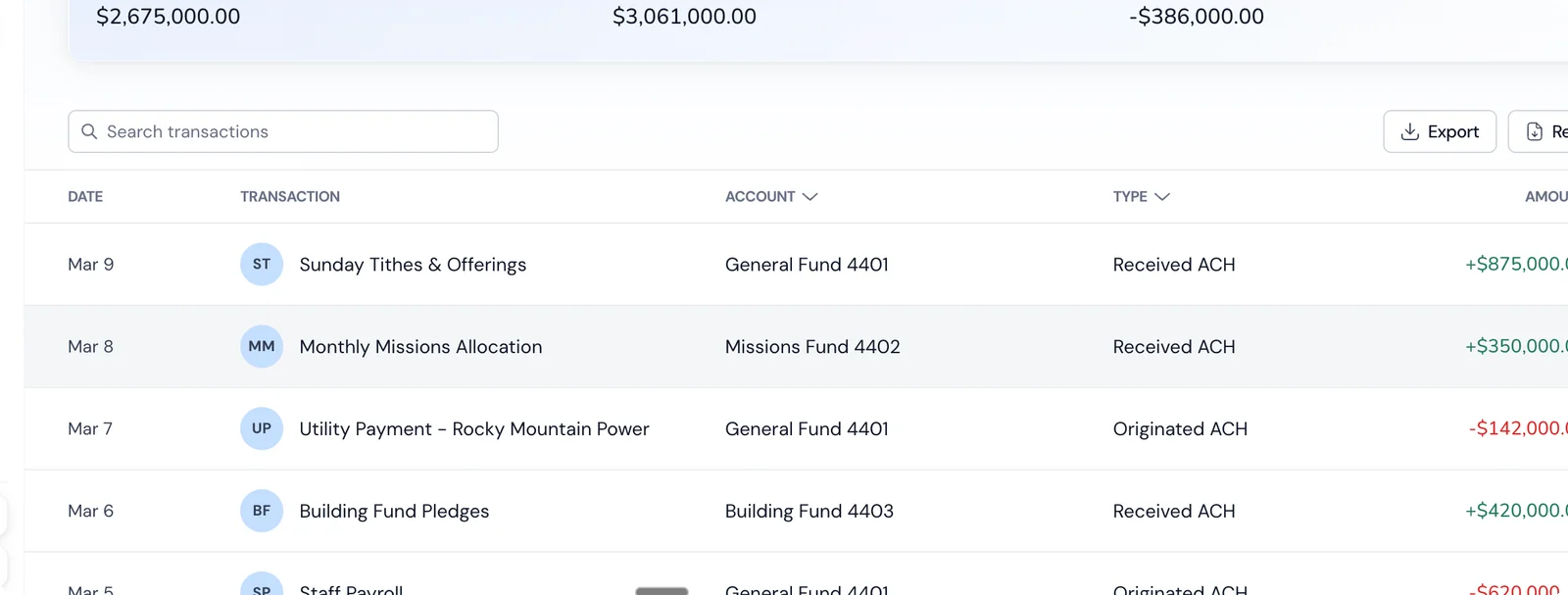
It's not the right fit for every nonprofit — large organizations with complex multi-entity structures and federal grant portfolios may need an enterprise solution. But for small to mid-size nonprofits that want proper fund accounting without the complexity and cost of enterprise software, it's worth evaluating.
The Bottom Line
The right nonprofit accounting software depends on three things: your organization's complexity (funds, grants, entities), your team's capacity (dedicated finance staff vs. ED-does-everything), and your budget (including the hidden costs of workarounds).
Don't overcomplicate it. Match your tier, test with real data, talk to similar organizations, and calculate total cost of ownership — not just the sticker price. The best software is the one your team will actually use correctly, consistently, and without dreading month-end.
Related Reading
- [Nonprofit Accounting Software Guide](/resources/blog/nonprofit-accounting-software-guide) — The complete guide to what matters when choosing nonprofit accounting software.
- [Nonprofit Bookkeeping Services Guide](/resources/blog/nonprofit-bookkeeping-services-guide) — When and how to add professional bookkeeping to your accounting setup.
- [Nonprofit Bank Accounts Guide](/resources/blog/nonprofit-bank-accounts-guide) — How your banking choice affects your accounting workflow.
- [Best Bank Accounts for Nonprofits in 2026](/resources/blog/best-bank-accounts-for-nonprofits-2026) — Side-by-side banking comparison for nonprofits.
- [Best Free Nonprofit Accounting Software](/resources/blog/best-free-nonprofit-accounting-software) — Free tools reviewed with honest assessments.
- [Holdings for Nonprofits](/solutions/nonprofits) — Banking + accounting designed for nonprofit organizations.