
Multi-Entity Accounting Software: Guide for Firms with Multiple Entities
Managing finances across multiple entities doesn't have to mean juggling spreadsheets and logging into separate systems.
If you're managing the books for more than one business entity — whether that's multiple LLCs, a parent company with subsidiaries, or a professional services firm with separate operating and holding companies — you already know the pain. Separate logins. Separate bank accounts that don't talk to each other. Manual consolidation in Excel every month. Inter-company transactions that somehow never balance.
Multi-entity accounting software exists to solve this. But the category is confusing, the pricing is opaque, and the wrong choice can cost you more in implementation and workarounds than the software itself. This guide covers everything: what multi-entity accounting actually means, how to set it up properly, how to handle client funds, what professional services firms specifically need, and how to evaluate your options.
What Multi-Entity Accounting Actually Means
Multi-entity accounting is the ability to manage the books for multiple legal entities — each with its own chart of accounts, bank accounts, and financial statements — within a single software platform, with the ability to consolidate reporting across all entities.
That last part is key. You can manage multiple entities in separate QuickBooks files. That's not multi-entity accounting — that's multiple instances of single-entity accounting, with you as the human integration layer.
True multi-entity accounting means:
- One login to access all entities
- Standardized chart of accounts that can be templated across entities (while still allowing entity-specific accounts)
- Inter-entity transactions that automatically create matching entries on both sides
- Consolidated reporting that rolls up financials across entities with proper eliminations
- Entity-level permissions so your team sees only what they need to see
Why Spreadsheets and Separate Files Don't Scale
We need to talk about this because it's where most multi-entity operations start — and where many stay far too long.
The spreadsheet consolidation trap:
- Month-end arrives. You export financials from Entity A's QuickBooks, Entity B's QuickBooks, and Entity C's Xero (because of course they're not all on the same platform).
- You paste everything into a master Excel workbook.
- You manually identify and eliminate inter-company transactions.
- You adjust for different chart-of-accounts structures.
- You build the consolidated statements.
- You find a $4,200 discrepancy and spend three hours tracking it to an inter-company payment that was recorded in Entity A but not Entity B.
- You fix it, regenerate the consolidation, and send it to the owners at 11pm.
This works when you have two entities and a handful of inter-company transactions per month. It breaks when you have three or more entities, significant inter-company activity, or need real-time visibility into the combined financial position.
What breaks first:
- Inter-company balances. Without automated matching, inter-company receivables and payables drift out of sync. By year-end, reconciling them is a multi-day project.
- Cash visibility. You can't see total cash across entities without logging into each bank account separately.
- Reporting lag. Consolidated numbers are only as current as your last manual consolidation — usually weeks old.
- Audit readiness. Auditors love clean inter-company elimination schedules. Spreadsheet consolidations produce the opposite.
How to Set Up Multi-Entity Books Properly
Whether you're starting fresh or cleaning up an existing mess, these principles apply:
1. Standardize Your Chart of Accounts
Every entity should use the same chart of accounts structure. Same account numbers, same account names, same hierarchy. Entity-specific accounts (like a particular revenue stream that only applies to one LLC) get added to the standard template — they don't replace it.
Why: Consolidated reporting requires mapping accounts across entities. If Entity A calls it "Professional Services Revenue" (account 4100) and Entity B calls it "Consulting Income" (account 4050), your consolidation is already broken.
How to do it:
- Create a master chart of accounts template
- Number accounts consistently (e.g., 1000–1999 for assets, 2000–2999 for liabilities across all entities)
- Document the standard in a shared reference so new entities follow it
- Review and align existing entities before migrating to new software
2. Dedicated Bank Accounts Per Entity
Every legal entity needs its own bank account(s). Commingling funds across entities creates legal liability, complicates tax filings, and makes your accountant's life miserable.
The basics:
- One operating checking account per entity (minimum)
- Savings or reserve accounts as needed
- Payroll accounts if the entity has employees
- A dedicated account for client funds if the entity holds money in trust (more on this below)
The common mistake: Using one bank account for two LLCs and "tracking it in the books." This works until it doesn't — and "doesn't" usually means a lawsuit, an audit, or a tax filing where the IRS questions why LLC A's bank account shows payments for LLC B's expenses.
3. Document Inter-Entity Transactions Religiously
Every time money moves between entities — whether it's a loan, a management fee, a shared expense allocation, or a capital contribution — it needs to be recorded in both entities with matching amounts and clear descriptions.
Set up inter-company accounts:
- Create a "Due to/Due from [Entity Name]" account in each entity
- Every inter-entity transaction gets recorded on both sides
- Reconcile inter-company balances monthly (not quarterly, not annually)
- Keep supporting documentation for every inter-entity transaction
Common inter-entity transaction types:
- Management fees: A parent company charges subsidiaries for shared services
- Shared expenses: Rent, insurance, or software that benefits multiple entities, allocated by an agreed-upon method
- Loans: One entity lends money to another (document the terms — the IRS scrutinizes related-party loans)
- Capital contributions: An owner moves money into an entity
4. Automate Eliminations
When you consolidate, inter-company transactions need to be eliminated so you're not double-counting. If Entity A recorded $10,000 in management fee income from Entity B, and Entity B recorded $10,000 in management fee expense to Entity A, the consolidated statement should show neither — they cancel out.
Good multi-entity software automates this. If you're doing it manually, you need an elimination journal entry template that you run every consolidation period.
Managing Client Funds: Trust, IOLTA, and Escrow Accounts
If your business holds money that belongs to clients — law firms, real estate companies, property managers, financial advisors, escrow agents — this section is critical. Getting client fund management wrong isn't just an accounting problem; it's a compliance problem that can end your business.
Types of Client Fund Accounts
Trust Accounts
General trust accounts hold client funds for a specific purpose — a retainer for legal services, funds held pending a real estate closing, client money held for investment. The key characteristic: this money belongs to the client, not to you. It should never appear on your income statement.
IOLTA Accounts (Interest on Lawyers' Trust Accounts)
Specific to law firms. When a lawyer holds client funds that are too small to earn meaningful interest individually, they're pooled in an IOLTA account. The interest goes to the state bar's legal aid fund, not to the lawyer or client. Every state has specific IOLTA rules — your software needs to support compliance.
Escrow Accounts
Funds held by a neutral third party until conditions are met. Common in real estate, M&A transactions, and construction. The escrow holder has strict obligations about how these funds are managed and released.
How to Structure Client Fund Accounting
Rule #1: Complete segregation. Client funds live in separate bank accounts from your operating funds. This isn't optional — it's a legal and ethical requirement in virtually every jurisdiction for regulated industries.
Rule #2: Individual client tracking. You need to know exactly how much belongs to each client at all times. If Client A has $5,000 in trust and Client B has $12,000, your records need to show that — not just a $17,000 trust balance.
Rule #3: Three-way reconciliation. Every month, you reconcile three things:
- The bank statement balance
- Your books' trust account balance
- The sum of individual client trust ledgers
All three numbers must match. A discrepancy — even $0.01 — needs to be investigated and resolved immediately.
Rule #4: Never, ever commingle. Don't pay firm expenses from the trust account. Don't deposit firm income into the trust account. Don't "borrow" from the trust account because payroll is tight. These are the compliance mistakes that result in license revocations, lawsuits, and criminal charges.
What Your Software Needs for Client Funds
- Separate ledger or sub-accounts for each client within the trust account
- Ability to track trust account activity distinctly from operating activity
- Three-way reconciliation reporting
- Audit trail showing every deposit, withdrawal, and transfer with client attribution
- Alerts for negative client balances (this should never happen, but software should flag it immediately if it does)
What Professional Services Firms Need
Law firms, accounting firms, consulting firms, architecture studios, engineering companies — professional services businesses have accounting needs that generic software handles poorly. Here's what specifically matters:
Project-Based Accounting
Revenue and expenses need to be tracked by project, client, or engagement — not just by account category. When a partner asks "are we making money on the Smith engagement?" the answer should be immediate, not a research project.
What to look for:
- Project-level P&L reporting
- Budget-to-actual by project
- Work-in-progress (WIP) tracking
- The ability to allocate shared costs (office rent, admin salaries) to projects
Time Tracking Integration
Professional services firms bill for time. Your accounting software needs to either include time tracking or integrate seamlessly with your time tracking tool (Harvest, Toggl, Clio, etc.).
What matters:
- Time entries flow into billing without rekeying
- Different billing rates by person, project, or client
- Non-billable time tracked separately
- Utilization reporting (billable hours / total hours)
Revenue Recognition
If you bill on a percentage-of-completion basis, receive retainers, or have long-term contracts, your revenue recognition needs are more complex than "invoice goes out, revenue is recorded."
ASC 606 compliance requires recognizing revenue when performance obligations are satisfied, which may not align with when you send the invoice. Your software should support:
- Deferred revenue tracking
- Percentage-of-completion recognition
- Retainer drawdown tracking
- Revenue schedules that separate billing from recognition
Accounts Receivable Management
Professional services firms often carry significant receivables. Aging reports, collection workflows, and cash flow forecasting based on outstanding invoices are essential — not optional.
Multi-Entity Support
Many professional services firms operate multiple entities: a management company, an operating company, a holding company, separate entities for different practice areas or geographic offices. See the multi-entity setup section above — it all applies here.
Evaluating Multi-Entity Accounting Software
Here's how the major platforms compare:
QuickBooks Online (Advanced)
Multi-entity: Sort of. You can manage multiple "companies" under one Intuit account, but they're separate subscriptions with separate data files. No consolidated reporting without a third-party add-on (like QuickBooks Consolidation Tool or Fathom). No automated inter-company transactions.
Client funds: Basic. You can set up a separate bank account and track it, but there's no built-in client-level sub-ledger or three-way reconciliation.
Professional services: Time tracking is built in. Project tracking is available in the Advanced tier. Revenue recognition is limited.
Best for: Firms with 2–3 entities and simple inter-company transactions. You'll outgrow it if you need real consolidation.
Xero
Multi-entity: Similar to QuickBooks — separate organizations, one login. No native consolidation. Add-ons like Syft Analytics help with consolidated reporting.
Client funds: No native trust accounting. You'll track it manually with separate bank accounts.
Professional services: Good project tracking. Integrates well with time tracking tools. Revenue recognition is basic.
Best for: Small firms that use the Xero ecosystem heavily. Better international support than QuickBooks.
Sage Intacct
Multi-entity: This is where Sage Intacct shines. True multi-entity with consolidated reporting, automated inter-company eliminations, and entity-level permissions. The gold standard for mid-market multi-entity accounting.
Client funds: Supports it through dimensions and sub-ledgers, but implementation is complex.
Professional services: Strong. Project accounting, time and expense management, revenue recognition (ASC 606 compliant), and resource planning.
Best for: Growing firms with 3+ entities, complex reporting needs, and the budget for implementation ($10K–$50K+ setup). Annual subscriptions typically run $15,000–$50,000+.
NetSuite
Multi-entity: Comprehensive. OneWorld edition handles multi-entity, multi-currency, and multi-subsidiary with consolidated reporting. More powerful than Sage Intacct in many ways, but also more complex.
Client funds: Supports it, but requires customization.
Professional services: NetSuite SRP (Services Resource Planning) module covers project accounting, resource management, time/expense tracking, and billing.
Best for: Firms with 10+ entities, international operations, or plans to scale significantly. Pricing is enterprise-level ($30,000–$100,000+ annually).
BQE Core
Multi-entity: Limited. Primarily designed for single-entity professional services firms.
Client funds: Trust accounting available, designed for law and architecture firms.
Professional services: Purpose-built. Project accounting, time tracking, billing, and reporting designed for AEC (architecture, engineering, construction) and professional services firms.
Best for: Single-entity professional services firms that want an industry-specific solution.
Holdings
Multi-entity: Banking and accounting in one platform with multi-entity support. Each entity gets its own accounts and books, with consolidated visibility across the organization.
Client funds: Separate account structures for operating and client funds, with entity-level segregation.
Professional services: Built-in accounting with project-level tracking. Designed for firms that want banking and books unified rather than stitching together separate systems.
Best for: Professional services firms and multi-entity organizations that want one platform for banking and accounting instead of managing separate systems. Particularly strong for firms tired of reconciling between their bank and their accounting software.
How Holdings Handles Multi-Entity
Holdings approaches multi-entity differently than traditional accounting software because it starts from the banking side.
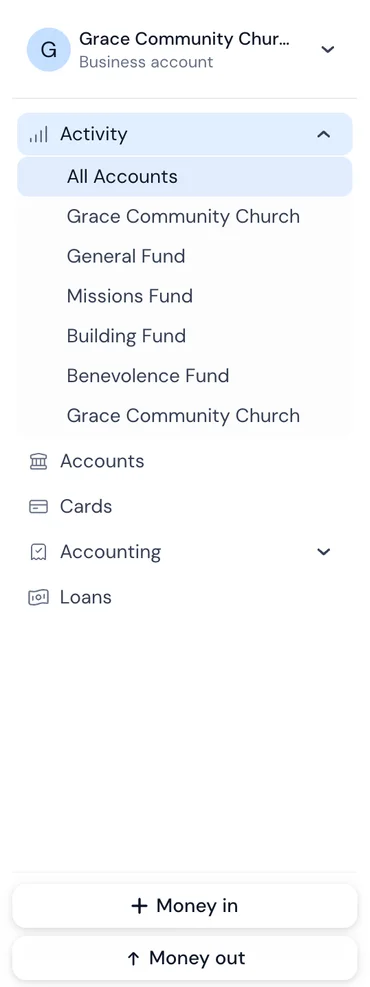
Each entity gets its own bank accounts and books. No commingling, no workarounds. When you open the platform, you see your entities in the sidebar and switch between them instantly.
Inter-entity transactions are clean. When money moves between entities, both sides of the transaction are recorded. No manual matching, no month-end reconciliation headaches.
Consolidated visibility. See cash positions, revenue, and expenses across all entities from a single dashboard. No Excel consolidation.
Banking and accounting are the same system. Transactions flow from the bank account into the books automatically. Reconciliation isn't a monthly chore — it happens in real time because the bank and the books are the same platform.
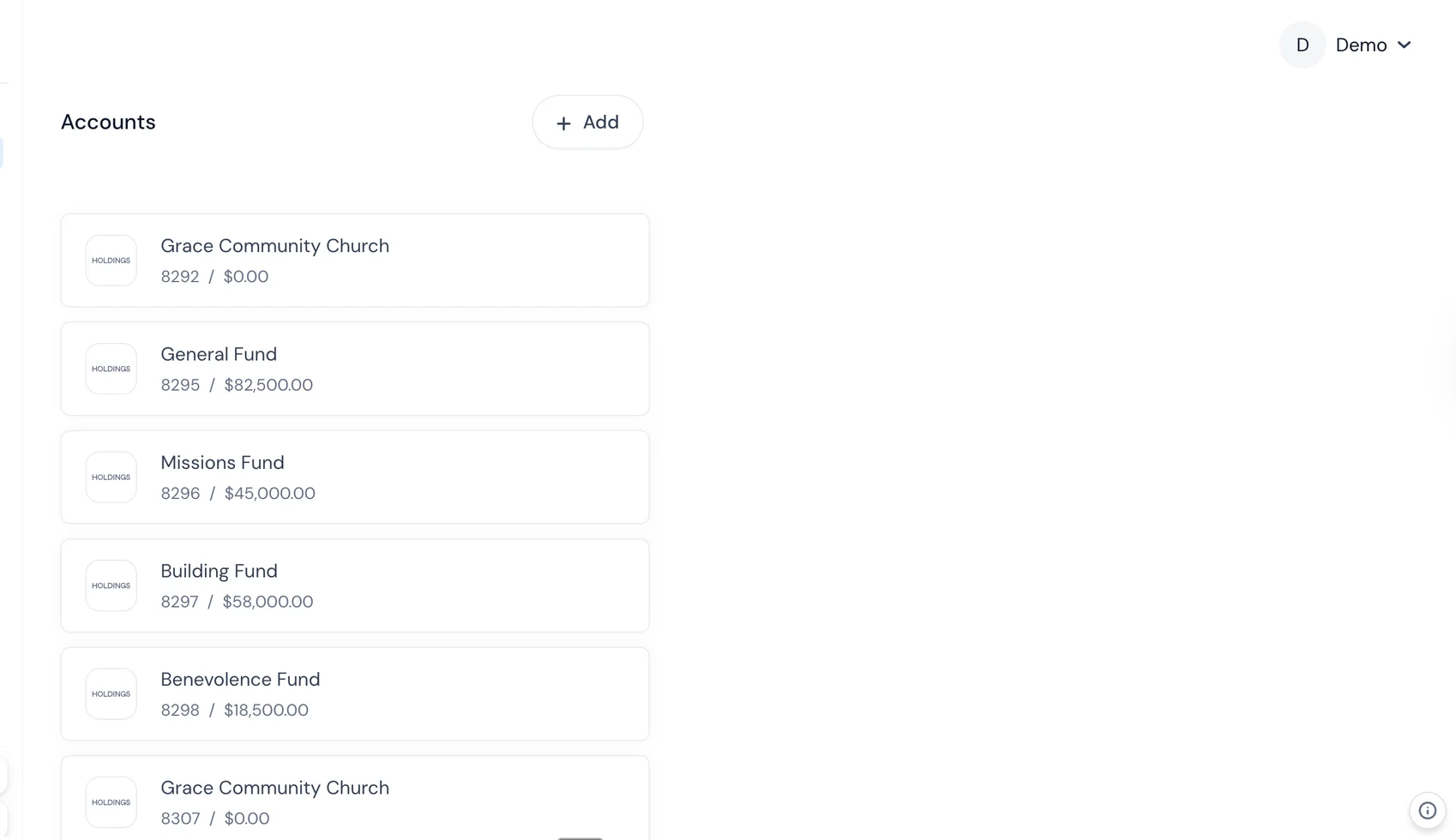
For professional services firms with client fund obligations, Holdings supports separate account structures that maintain the segregation required for trust, IOLTA, and escrow accounts — with the accounting built in.
Frequently Asked Questions
How many entities before I need multi-entity software?
At two entities, you can probably manage with separate accounting files and a manual consolidation spreadsheet. At three, it starts to hurt. At four or more, dedicated multi-entity software pays for itself in time savings alone.
Can I use separate QuickBooks files and consolidate in Excel?
You can, and many firms do. It works until it doesn't — and "doesn't" usually means growing inter-company transactions, monthly consolidation taking a full day, and year-end audit prep becoming a multi-week project. If you're spending more than 4 hours per month on manual consolidation, the software would likely be cheaper.
How do I handle inter-entity loans?
Document everything. Create a formal loan agreement between the entities (yes, even if you own both). Record the loan as a receivable in the lending entity and a payable in the borrowing entity. Track interest if applicable — the IRS has Applicable Federal Rates (AFR) that set minimum interest rates for related-party loans. Your multi-entity software should maintain matching balances automatically.
What about shared employees?
If an employee works for multiple entities, you have options: employ them in one entity and charge management fees to the others, or set up a management company that employs shared staff and allocates costs. The second approach is cleaner but adds an entity. Discuss with your tax advisor — the structure impacts payroll tax obligations and workers' comp.
How do I allocate shared expenses across entities?
Pick a consistent, defensible allocation method: revenue-based, headcount-based, square footage-based, or time-based. Document the method in a written allocation policy. Apply it consistently every period. Your multi-entity software should support automatic allocations based on predefined rules.
Do I need separate bank accounts for each entity?
Yes. This is not optional. Commingling funds across legal entities undermines the liability protection the entity structure provides (this is called "piercing the corporate veil") and creates tax filing complications. Every entity gets its own bank account(s).
What about client trust accounts — can they be in the same bank as operating accounts?
They can be at the same bank, but they must be separate accounts. Many firms find it cleaner to use a different bank for trust funds entirely — it creates a natural barrier against accidental commingling. Check your state bar rules or industry regulations for specific requirements.
How do I transition from separate files to multi-entity software?
Plan for the start of a fiscal year if possible. Steps: (1) Standardize your chart of accounts across entities, (2) Clean up inter-company balances so they match, (3) Export opening balances from each entity, (4) Import into the new platform, (5) Run parallel for one month, (6) Cut over. Budget 4–8 weeks for the transition, depending on complexity.