
How to Open a Business Bank Account: Step-by-Step Guide
Everything you need to open a business bank account — required documents, how to choose a bank, online vs in-person setup, and common mistakes to avoid.
Opening a business bank account is one of those things that sounds simple until you're actually doing it. You show up at the bank with what you think is the right paperwork, and they ask for three more documents you've never heard of. Or you apply online and get rejected because your LLC's name doesn't exactly match what's on file with your state.
This guide walks through the whole process — what you need, how to do it, what goes wrong, and how long it actually takes. We'll cover every common business type, with extra detail on LLCs and EINs since those cause the most confusion.
Why You Need a Separate Business Account
Let's get this out of the way: yes, you need one. Even if you're a solo freelancer. Even if your business is tiny. Here's why:
Legal protection. If you're operating as an LLC or corporation, commingling personal and business funds can "pierce the corporate veil" — legal speak for losing the liability protection your business structure provides. If someone sues your LLC and you've been running business expenses through your personal checking account, a court might decide that LLC doesn't actually exist as a separate entity.
Tax simplicity. Come tax time, your accountant (or you, if you're doing it yourself) needs to separate business income and expenses from personal ones. If everything runs through one account, that means going through every transaction manually. A separate account makes this automatic.
Professionalism. Clients pay "Your Business Name LLC," not your personal name. It looks better, builds trust, and is required by some payment processors and merchant services.
Financial clarity. You can't manage what you can't measure. A separate account gives you a clear picture of business cash flow — what's coming in, what's going out, and what's left.
What You Need: By Business Type
The documents required depend on your business structure. Here's the complete breakdown:
Sole Proprietorship
The simplest setup. You may not even need an EIN.
Required:
- Government-issued photo ID (driver's license, passport)
- Social Security Number (SSN) — or EIN if you have one
- Business license or DBA ("Doing Business As") registration if you operate under a name that isn't your legal name
That's it. Some banks will open a "business" account for a sole proprietor with just an ID and SSN. If you use a business name (anything other than your legal name), you'll need the DBA filing from your county or state.
Limited Liability Company (LLC)
LLCs require more documentation, and this is where most delays happen. Here's the full list:
Required:
- Articles of Organization — the document filed with your state to create the LLC. This is your LLC's birth certificate.
- EIN confirmation (IRS Letter 147C or CP 575) — see the EIN section below
- Operating Agreement — the document that spells out who owns the LLC, how decisions are made, and how profits are distributed. Yes, even single-member LLCs should have one. Banks increasingly require it.
- Government-issued photo ID for all members/managers who will be signers on the account
- Certificate of Good Standing (sometimes called Certificate of Existence) — proves your LLC is current with state filings. Not all banks require this, but many do if your LLC is more than a year old.
Single-member LLC specifics:
Your operating agreement can be simple — even a one-page document works. It should state that you're the sole member and have full authority over the LLC's banking. Some banks accept a "Member Resolution" in place of a formal operating agreement.
Multi-member LLC specifics:
The bank will want to see who the members are (with ownership percentages), who has authority to open accounts and sign on behalf of the LLC, and possibly a resolution specifically authorizing the account opening. If your operating agreement says all members must agree on financial decisions, you might need all members present (or signed resolutions from each).
The operating agreement issue: A surprising number of LLCs don't have a written operating agreement. Many states don't require one — your LLC can legally exist without it. But banks do ask for it, and not having one can delay your application by days or weeks. If you don't have one yet, draft one before you go to the bank. Templates are available online, or have an attorney review one for $200–$500.
Corporation (C-Corp or S-Corp)
Required:
- Articles of Incorporation — filed with your state
- EIN confirmation
- Corporate bylaws
- Board resolution authorizing the account and naming authorized signers
- Government-issued photo ID for all authorized signers
- Certificate of Good Standing (often required)
Note: Banks take corporate documentation more seriously because there's a more formal governance structure. The board resolution needs to be specific — name the bank, the account type, and each authorized signer by full legal name.
Partnership
Required:
- Partnership agreement — who the partners are, their ownership percentages, and who has authority over banking
- EIN confirmation
- Government-issued photo ID for all partners who will sign on the account
- DBA registration if the partnership uses a trade name
Nonprofit
See our nonprofit bank accounts guide for the complete breakdown. Short version: you'll need articles of incorporation, bylaws, EIN, IRS determination letter, and a board resolution.
The EIN Explainer: Everything You Need to Know
The Employer Identification Number (EIN) is probably the most-asked-about piece of the business bank account puzzle. Let's clear it all up.
What an EIN Is
An EIN is a nine-digit number assigned by the IRS to identify your business for tax purposes. Think of it as a Social Security Number for your business. It looks like this: XX-XXXXXXX.
Who Needs an EIN
You definitely need one if:
- Your business has employees
- Your business is structured as a corporation or partnership
- You file certain tax returns (employment, excise, alcohol/tobacco/firearms)
- You withhold taxes on income paid to a non-resident alien
- You have a Keogh plan
You technically don't need one if:
- You're a sole proprietorship with no employees
- You're a single-member LLC with no employees (you can use your SSN)
Why You Should Get One Anyway
Even if you're a solo freelancer who doesn't technically need an EIN, get one. Here's why:
Privacy. Without an EIN, your SSN goes on every W-9, every bank document, every vendor form. An EIN reduces how widely your SSN is distributed, which reduces identity theft risk.
Professionalism. Clients and vendors expect a business to have an EIN. It signals that you're a real, established business — not someone freelancing on the side.
Bank requirements. Many banks require an EIN for business accounts, even for sole proprietors. Having one ready eliminates a potential blocker.
Future-proofing. If you ever hire an employee, form a partnership, or change your business structure, you'll need one. Getting it now saves you from having to change your bank account setup later.
How to Get an EIN (It Takes 5 Minutes)
No, seriously. Five minutes. It's free. Here's how:
- Go to the IRS website: irs.gov/businesses/small-businesses-self-employed/apply-for-an-employer-identification-number-ein-online
- Click "Apply Online Now." The application is available Monday–Friday, 7am–10pm Eastern.
- Answer the questions. Business type, reason for applying, responsible party information. It's straightforward.
- Get your EIN immediately. At the end of the online application, your EIN is displayed on screen. You can download or print the confirmation (CP 575 letter).
Important: Save that CP 575 letter. Some banks want to see it, and if you lose it, getting a replacement (Letter 147C) requires calling the IRS, which means waiting on hold. Don't put yourself through that.
Alternative methods:
- Fax: Fill out Form SS-4 and fax it to the IRS. You'll get your EIN in about 4 business days.
- Mail: Same form, mailed to the IRS. Takes 4–5 weeks. Don't do this unless you have no other option.
- Phone: Call the IRS Business & Specialty Tax Line. International applicants can use this method.
Common EIN Mistakes
- Applying for multiple EINs for the same entity. Each legal entity gets one EIN. If you already have one, don't apply again — even if you lost the number. Call the IRS to retrieve it.
- Using the wrong responsible party. The responsible party is the person who controls the entity. For a single-member LLC, that's you. For a multi-member LLC, it's typically the managing member.
- Waiting until you're at the bank. Get your EIN before you go. Banks can't open the account without it (if required), and you don't want to be doing an IRS application on your phone in the bank lobby.
Step by Step: Opening the Account
1. Choose Your Bank
Consider:
- Fees: Monthly maintenance fees, transaction fees, minimum balance requirements
- Features: Online banking quality, mobile deposit, multi-user access, integration with accounting software
- Access: Branch locations (if you need them), ATM network
- Business tools: Invoicing, payment processing, lending products
For a detailed comparison framework, see our guide to choosing a business bank (the evaluation criteria apply to all businesses, not just nonprofits).
2. Gather Your Documents
Use the checklist for your business type above. Make copies of everything. If applying in person, bring originals — many banks want to verify them.
3. Apply
Online: Most major banks and fintechs offer online applications. Expect to upload documents and verify your identity. Processing takes 1–5 business days.
In person: Bring everything. Expect the process to take 30–60 minutes. The banker will verify your documents, enter your information, and may run a personal credit check (this is standard — they're checking for fraud history, not creditworthiness).
Phone: Some banks allow you to start the process over the phone and finish online or by mail.
4. Make Your Initial Deposit
Most banks require an initial deposit to open the account. This ranges from $0 (some online banks) to $100 (typical for traditional banks) to $1,000+ (some premium business accounts). Ask about this upfront so you're not caught off guard.
5. Set Up Online Banking
Do this immediately. Create your login, enable two-factor authentication, set up alerts (low balance, large transactions, new payee), and add any additional users who need access.
6. Connect Your Accounting Software
Link your new bank account to QuickBooks, Xero, Holdings, or whatever you use. The sooner you do this, the less manual data entry you'll need to do later.
7. Update Your Records
Notify anyone who needs the new account information: payment processors, clients who pay via ACH, payroll providers, vendors on auto-pay. Miss this step and you'll have payments going to the wrong place.
Common Mistakes (and How to Avoid Them)
Applying before your LLC is fully formed. Your articles of organization need to be filed and accepted by the state before you can open an account. If your filing is still "pending," the bank will turn you away.
Name mismatch between documents. If your articles say "Smith Consulting LLC" and your EIN says "Smith Consulting, LLC" (note the comma), some banks will flag this. Make sure your business name is identical across all documents.
Not having an operating agreement. As mentioned above, many LLCs skip this. Banks increasingly require it. Draft one before you apply.
Bringing the wrong people. If you're a multi-member LLC and the operating agreement requires all members to authorize banking, every member may need to be present (or provide notarized authorization). Check with the bank ahead of time.
Forgetting the Certificate of Good Standing. This one catches people off guard because not all banks require it. If your LLC is more than a year old, bring one just in case. You can usually get it from your Secretary of State's website for $5–$20.
Using a personal account "temporarily." There's nothing more permanent than a temporary solution. Open the business account first, even if your business hasn't earned a dollar yet.
Common Delays and How to Avoid Them
LLC-Specific Delays
State processing time. In some states, articles of organization take 1–2 weeks to process. If you used a registered agent service, make sure the filing is actually complete before you head to the bank.
EIN mismatch. The IRS needs your LLC's exact legal name. If there's a discrepancy between your state filing and your EIN application, it can cause issues.
Operating agreement revisions. If the bank doesn't accept your operating agreement (too vague, missing banking authorization language), you'll need to revise and come back.
Beneficial ownership verification. Under the Corporate Transparency Act (CTA), banks collect beneficial ownership information. For multi-member LLCs, every person who owns 25%+ or exercises significant control needs to be identified. Have their names, addresses, dates of birth, and ID numbers ready.
General Delays
Compliance review. If your business type triggers enhanced due diligence (money services businesses, cannabis-adjacent companies, international transactions), the bank's compliance team will review your application separately. This can add 1–3 weeks.
Documentation requests. Banks may ask for additional documents after you apply. Respond quickly — these requests often have time limits, after which your application is cancelled and you start over.
Credit check issues. A personal credit check is standard. It won't affect your credit score (it's a soft pull), but if there are fraud alerts on your credit file, it can trigger additional verification steps.
How Long Does It Take?
Online banks and fintechs: Often same-day to 3 business days. Some can open your account in minutes.
Traditional banks (in person): You'll walk out with an account number the same day, but full functionality (online access, debit card, checks) takes 5–10 business days.
Traditional banks (online application): 3–7 business days for approval, plus time for online access setup and card delivery.
If complications arise: Add 1–3 weeks for compliance review, document requests, or LLC-related delays.
Holdings: Business Banking Without the Friction
Holdings was built to make business banking straightforward. Online application, fast onboarding, no unnecessary branch visits.
What you need: Your EIN, formation documents, and a government-issued ID. That's the core of it.
What you get: A business bank account with integrated accounting, multi-user access, and the tools to actually manage your business finances — not just hold them.
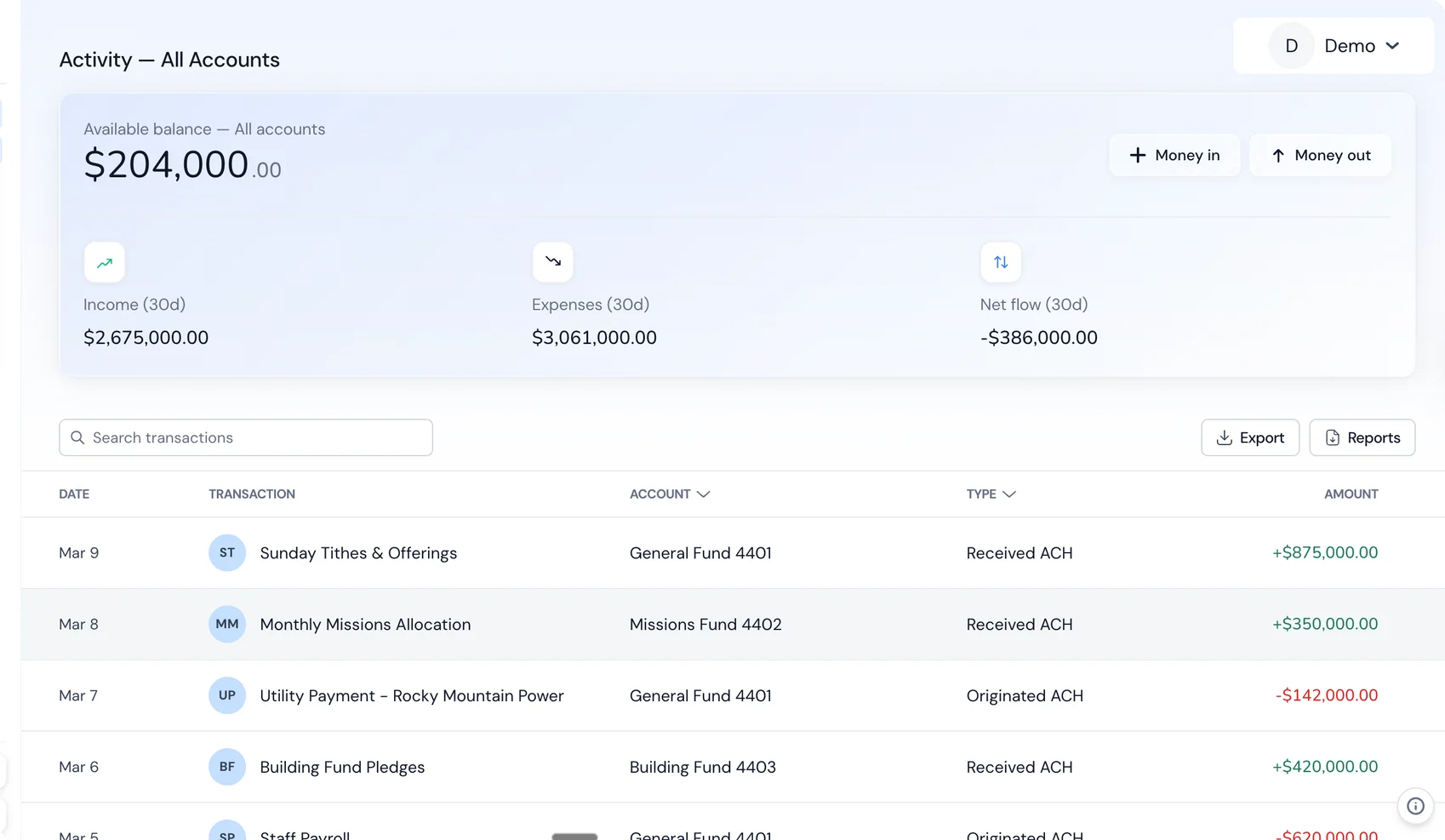
No monthly maintenance fees eating into your bottom line. No minimum balance requirements. No "talk to your banker" runaround when you need something simple.
For LLCs with multiple entities, Holdings supports multi-entity banking — separate accounts and books for each entity, with consolidated visibility across your business.
Frequently Asked Questions
Can I open a business account without an EIN?
If you're a sole proprietor with no employees, some banks will let you open an account with just your SSN. But most banks prefer an EIN for business accounts, and LLCs/corporations always need one. Since getting an EIN takes 5 minutes and costs nothing, just get one.
Do I need a business license to open a bank account?
Not always. Banks require formation documents (articles of organization/incorporation) and an EIN. A business license is a local government requirement that varies by city and county. Some banks ask for it; many don't. Check with your specific bank.
Can I open a business account with bad personal credit?
Usually yes. Banks run a soft credit check, but they're looking for fraud flags, not credit scores. A low credit score alone rarely prevents you from opening a basic business checking account. However, if you're applying for a business credit card or line of credit at the same time, credit score matters.
What if my LLC was formed in a different state than where I'm banking?
This is common and usually not a problem. You'll need your formation documents from the state where the LLC was formed, plus a foreign qualification or registration if required in the state where you're banking. Many online banks don't care about state at all.
How many bank accounts does my LLC need?
At minimum, one operating checking account. Consider adding: a savings account for taxes (set aside 25–30% of profit), a separate account for payroll if you have employees, and a separate account for client funds if you hold money in trust. Don't overcomplicate it — you can always add accounts later.
Can I change banks later?
Yes. It takes some coordination — update auto-payments, notify clients who pay via ACH, transfer recurring transactions — but it's straightforward. Plan for 2–4 weeks where both accounts are active to catch any stragglers.
Do I need a separate account for each LLC?
Yes. Every legal entity should have its own bank account(s). Commingling funds across LLCs undermines the liability protection each entity provides and creates tax complications. This is non-negotiable.
What's a DBA and do I need one?
A DBA ("Doing Business As") is a trade name — it lets you operate under a name different from your legal entity name. If your LLC is "Smith Holdings LLC" but you want to accept payments as "Brightpath Consulting," you need a DBA. File it with your county or state, and bring the registration to the bank.
My EIN application was rejected. What now?
This is rare but happens. Common causes: applying outside IRS online hours, entering inconsistent information, or the responsible party's SSN having an issue. Wait 24 hours and try again. If it continues to fail, use the fax or phone method. Don't create multiple applications — that can cause confusion with the IRS.