Do your own books — without the accounting degree.
Full financial tools for business owners who want control. Categorize transactions, run reports, manage expenses, send invoices and quotes, get paid. $25/mo — first 30 days free.
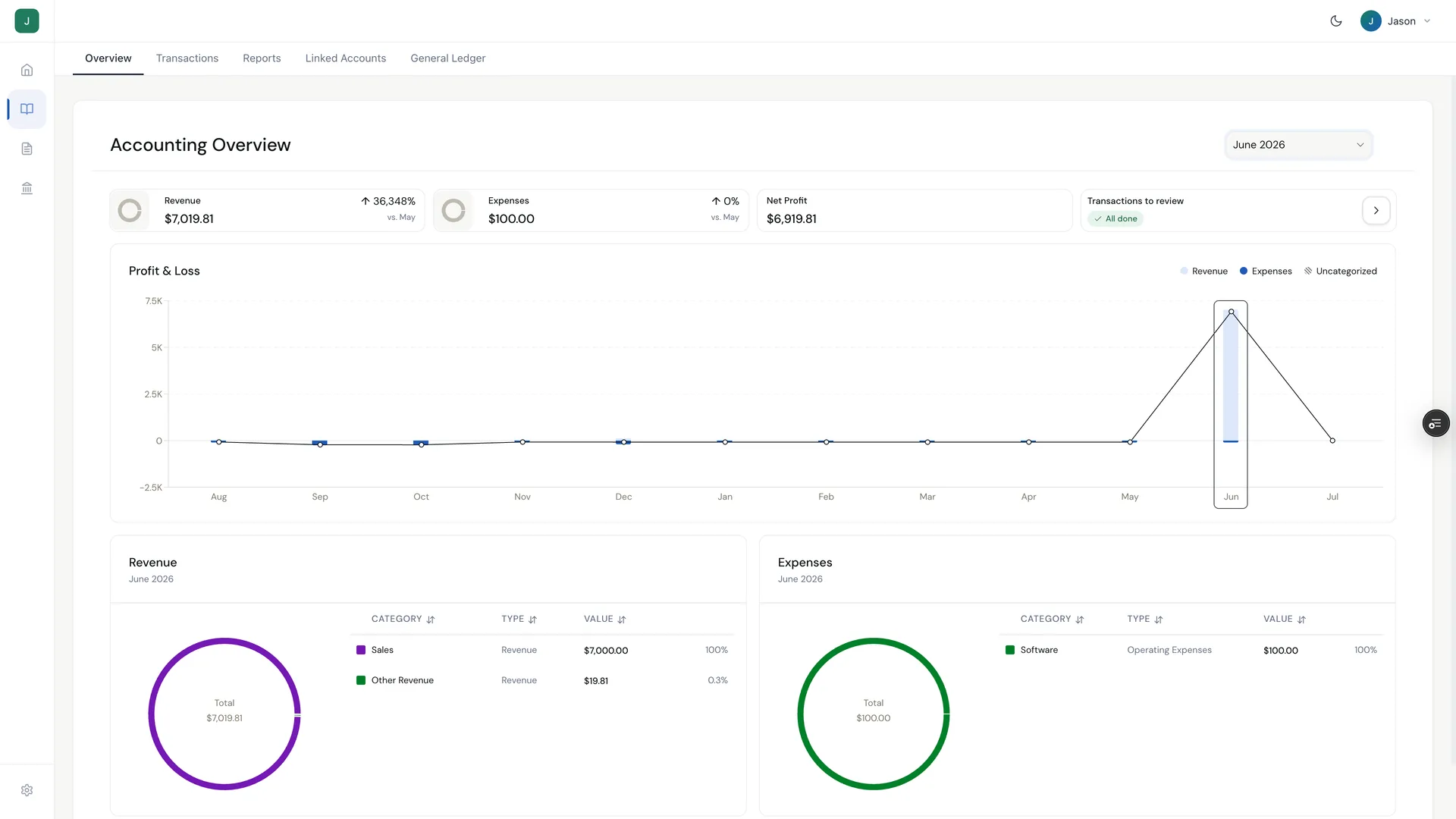
Accounting overview
January 2026Revenue
$42,680
+8.2%
Expenses
$18,340
+3.1%
Net profit
$24,340
+12.4%
Profit and loss
Accounting is one part of Software. The $25/mo plan also includes invoicing & quotes, tax tools, and cashflow scenarios — with a 30-day free trial to start.
Which option is right for you?
Select the statements that describe your situation
For founders who want control and visibility
- All accounts in one workspace
- Bulk categorization and reconciliation
- P&L, balance sheet, cash flow reports
- Accrual and cash basis support
- General ledger and journal entries
For founders who want clean books with less work
- Auto-categorization powered by machine learning
- Custom rules that match your chart of accounts
- Bulk categorization and reconciliation tools
- Always-current P&L and cash flow
- Read-only CPA access for tax time
Free accounting keeps your books organized
Software makes them automatic — invoices, linked accounts, and expenses flow directly into your ledger.
How much time will you save?
Calculate your potential time savings with our interactive calculator
Running a nonprofit?
Nonprofit accounting, built in
Set up your books as a nonprofit and Holdings uses nonprofit report formats automatically — Statement of Activities, Statement of Financial Position, and Net Assets, with no income-tax line. No renaming, no restructuring before every board meeting.
Holdings for nonprofits →Everything you need to keep books clean yourself
Overview Dashboard
See which months are closed and which still need work. Uncategorized transactions and reconciliation to-dos surface in one view so you know exactly where to focus.
- Focus on a specific month or date range
- Jump directly into uncategorized transactions
- Track progress across months at a glance
Accounting Overview
To-do:
Connected Accounts
Holdings Checking
Bank
Holdings Cards
Cards
Chase Business
External
Transaction Workspace
All your accounts in one place. Holdings banking, cards, and any external bank feeds flow into the same workspace.
- Bulk categorize with one action
- Split transactions across categories
- Attach receipts and notes inline
- Export to Excel for offline review
Reports
P&L, balance sheet, and cash flow — ready to share with investors, lenders, or your tax pro without reformatting.
- Filter by date range, entity, or account
- Switch between cash and accrual basis
- Download in Excel/CSV instantly
Available Reports
Chart of Accounts
General Ledger
Full chart of accounts with balances, journal entries, and reclassification tools — everything you need for audits and deeper analysis.
- Search and filter by account or date range
- Edit or reclassify entries directly
- Create manual journal entries
- Export ledger data to Excel
Want your books to mostly do themselves?
Auto-categorization, smart rules, and bank reconciliation keep your books current with minimal effort — you just review.
See how bookkeeping works in HoldingsEverything connected, nothing extra to buy
Connect, export, and collaborate without switching platforms
Native Integrations
Connect directly with QuickBooks, Xero, and other major accounting software — no manual imports needed.
External Accounts
Link external bank and credit card accounts — reconcile everything in one place.
Tax Tools
Quarterly estimates, mileage tracking, W-9 collection, and 1099 prep built in.
Cashflow Scenarios
Runway and cashflow forecasting to see what's ahead before it happens.
CPA Access
Grant read-only access to your CPA or accountant — no credential sharing needed.
CSV Export
Export transactions and reports to CSV for custom workflows, tax prep, or offline analysis.
Which option fits your situation?
- You have a part-time bookkeeper or CFO who just needs better tools
- You're comfortable with accounting and want full control
- You need accrual-basis accounting or want to create journal entries
- You want to save on bookkeeping costs while revenue is still low
- You have in-house finance expertise and want visibility into the ledger
- You're spending hours every month categorizing transactions
- You want smart rules to handle the repetitive work for you
- You don't have accounting experience and don't want to learn it all
- You're preparing for tax filing and want records that stay clean
- You'd rather review your books than build them by hand
10,000+
Transactions categorized daily
< 5 min
Average setup time
$25/mo
Accounting software cost
99.99%
Platform uptime
Frequently asked questions
Straight answers about Holdings accounting software
How much does Holdings accounting cost?
Software is $25/mo — full control of your books, reports, invoicing, and bank reconciliation — and every new subscription starts with a 30-day free trial. Banking is free with any plan.
Can I connect external bank accounts?
Yes. Holdings accounting syncs with all your bank and credit card accounts — not just your Holdings account — so you get a complete picture of your business finances.
What reports can I generate?
You can generate Profit & Loss statements, Balance Sheets, and Cash Flow reports in real time. All reports are tax-ready and can be shared with your CPA or bookkeeper.
How does transaction categorization work?
Holdings auto-categorizes transactions using machine learning. You can review, edit, and create custom rules to match your chart of accounts.
Does Holdings accounting work for nonprofits?
Yes. Nonprofits get purpose-built Fund Accounting at the same $25/mo — restricted fund tracking, grant tracking, and board-ready reports like the Statement of Activities. Verified 501(c)(3)s also get a free public profile, verified badge, and directory listing.
Can I export data to QuickBooks or Xero?
Yes — Holdings has native QuickBooks integration and works with Xero and other major accounting software. You can also export transactions as CSV and grant read-only CPA access so your accountant can pull reports directly.
Do I need to switch from my current bank to use Holdings accounting?
No. Holdings accounting works with external bank and credit card accounts — not just Holdings banking. You can connect all your financial accounts for a complete picture, even if you bank elsewhere.
How does Holdings handle multi-entity accounting?
Each entity gets its own chart of accounts, reports, and bank connections. You can switch between entities from one login without logging out.
Is there a mobile app for accounting?
Yes. The Holdings mobile app lets you review transactions, approve categorizations, and view key reports on the go. Full accounting functionality is available on desktop.
Ready to get your books in order?
Take control of your books
Start with accounting software and keep everything categorized, reconciled, and ready to share.
Start with accounting softwareLet automation carry the load
Auto-categorization, smart rules, and reconciliation tools keep your books current — so you spend minutes reviewing, not hours bookkeeping.
See how it worksNo matter which path you choose, your books stay connected to your Holdings banking, cards, and transactions. One system. One source of truth.